Beaming BW models to Snowflake
The model is already there
When people talk about moving SAP BW data to Snowflake, the conversation usually starts with the data. Which extractor, which replication tool, how to handle deltas, what the licence allows. All fair questions. But in my experience, the data is not where most of the work hides.
The work hides in the model. A grown BW/4HANA or a long-running 7.5 system has hundreds of DataStore objects and thousands of InfoObjects. Each InfoObject comes with keys, data types, texts in several languages, time-dependent attributes, compounding, navigation attributes and sometimes a reference to another InfoObject. Rebuilding all of that by hand in Snowflake takes weeks. It is also a reliable source of small mistakes: a NUMC field that turns into a number and loses its leading zeros, a missing key column, a text table without its language key.
The good news: BW already describes every bit of this model in its metadata. So the obvious question is whether we can read that metadata and generate the Snowflake side from it.
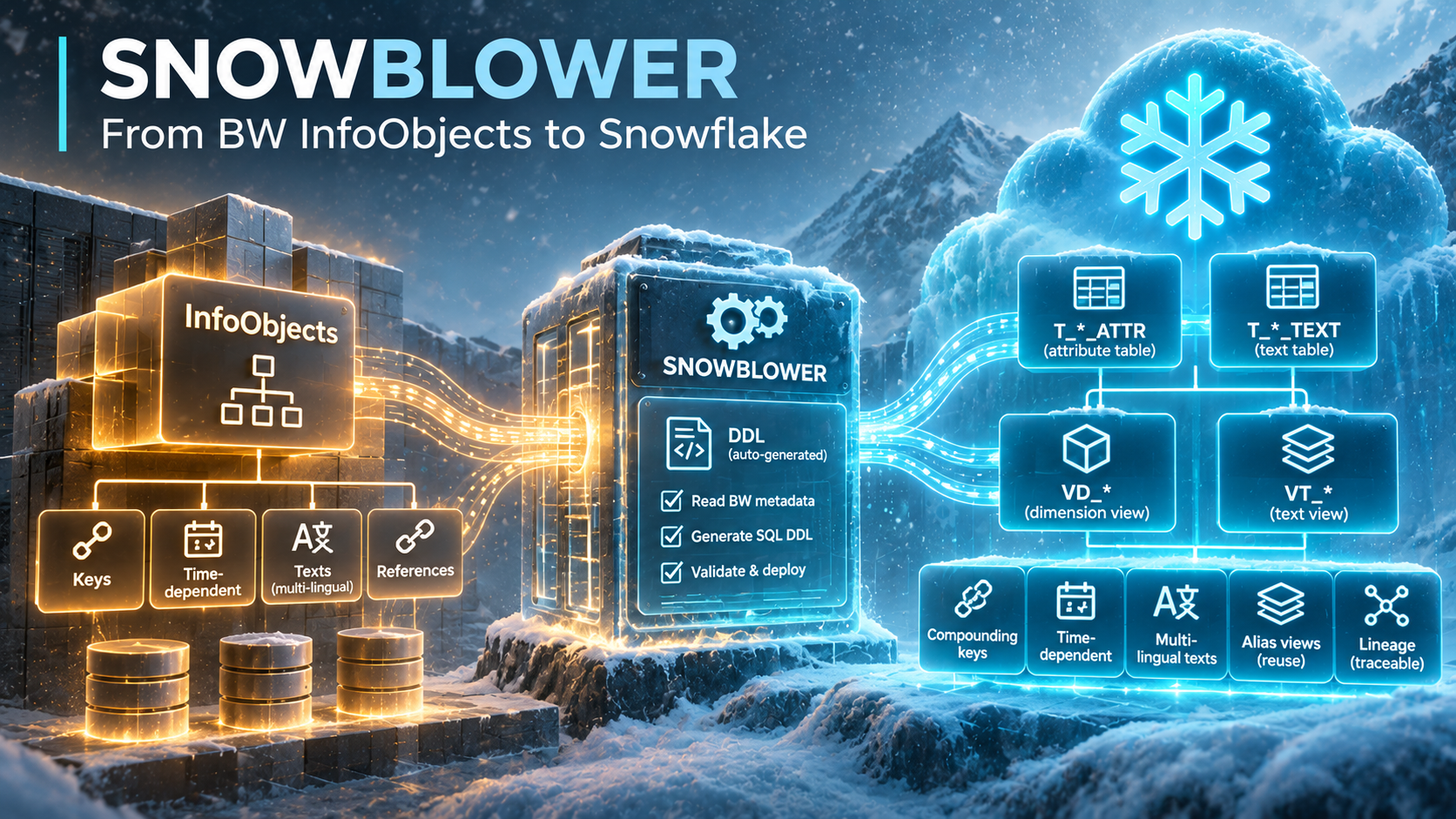
That is what we tried at ZPARTNER with a small internal prototype called Snowblower, a spin-off of an internal tool we built for BW to SAP Datasphere. The first three parts of this series walk through it: InfoObjects and references (this article), ADSOs and time characteristics, and loading data with BDC Connect.
We start with InfoObjects, because everything else builds on them. An ADSO in Snowflake is just a table of keys and numbers until its characteristics have master data and texts next to them.
What Snowblower does
The scope is intentionally narrow. Snowblower reads BW metadata and generates Snowflake DDL for two object types:
- An InfoObject with master data becomes an attribute table, a text table, a dimension view (
VD_) and a text view (VT_). - A DataStore object (advanced) becomes a table. That is the topic of part 2.
What it does not do: load data, build hierarchies, or translate CompositeProviders and queries.
The workflow is what a BW developer would expect. You log on to BW, pick the object type, search for the object and let Snowblower extract its metadata.
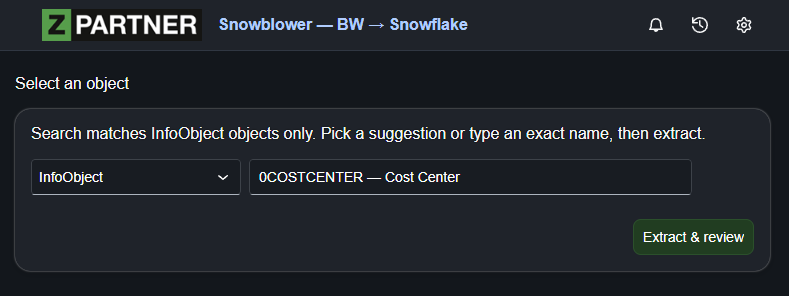
If you start from an ADSO instead, Snowblower includes every InfoObject it uses; more on that in part 2.
After the review, Snowblower generates the SQL, validates it and shows a summary, including warnings – more on those in part 2. You can download the script or deploy it straight to Snowflake, with a dry run first.
From InfoObject to tables and views
Let’s take 0COSTCENTER as the example. It’s a fitting example, since it has almost everything: compounding to the controlling area, time-dependent attributes, navigation attributes and texts.
In BW, its master data is spread over several tables:
/BI0/PCOSTCENTER– time-independent attributes/BI0/QCOSTCENTER– time-dependent attributes/BI0/TCOSTCENTER– texts
Snowflake has no master data concept, and a view cannot hold data. So each InfoObject needs base tables, with views on top for consumers. This is the same two-layer idea SAP Datasphere uses.
| BW | Snowflake | Schema |
|---|---|---|
| P table + Q table | T_COSTCENTER_ATTR (one merged table) | RAW |
| T table | T_COSTCENTER_TEXT | RAW |
| – | VD_COSTCENTER (dimension view) | CORE |
| – | VT_COSTCENTER (text view, all languages) | CORE |
Here is the generated attribute table, shortened:
CREATE TABLE T_COSTCENTER_ATTR (
  CO_AREA    VARCHAR(4)  NOT NULL COMMENT 'Controlling area; Compounding',
  COSTCENTER VARCHAR(10) NOT NULL COMMENT 'Cost Center; InfoObject: 0COSTCENTER',
  DATETO     DATE        NOT NULL COMMENT 'Valid to',
  DATEFROM   DATE                 COMMENT 'Valid from',
  COMP_CODE  VARCHAR(4)           COMMENT 'Company code; Attribute: 0COMP_CODE',
  OBJ_CURR   VARCHAR(5)           COMMENT 'Object Currency for CO Object; Attribute: 0OBJ_CURR',
  PROFIT_CTR VARCHAR(10)          COMMENT 'Profit Center; Attribute: 0PROFIT_CTR (navigation)',
  ...
  PRIMARY KEY (CO_AREA, COSTCENTER, DATETO)
) COMMENT = 'BW InfoObject 0COSTCENTER attributes (from /BI0/PCOSTCENTER + /BI0/QCOSTCENTER)';
The rules behind it:
- P and Q become one table. BW splits attributes by time dependency; If the InfoObject is time-dependent,
DATETObecomes part of the key, followed byDATEFROM. Merging P and Q at load time is a job for the loader, which we come to in part 3. - Compounding stays in the key.
CO_AREAcomes first, exactly as in BW. A cost center is only unique within its controlling area, and the Snowflake key says so. - BW’s technical columns disappear.
OBJVERSandCHANGEDonly make sense inside BW’s activation logic. In Snowflake there is one version of the truth per key. - Navigation attributes are ordinary columns. The comment marks them as navigation attributes, so the information is not lost.
- Dates become real dates. BW stores dates as eight characters and uses
00000000as its initial value. That is not a valid SnowflakeDATE. We use nativeDATEcolumns anyway (YYYY-MM-DD), because they make validity queries much easier. The price: the load has to turn00000000into NULL. - Every column has a comment. BW description plus technical name. Anyone browsing the table in Snowflake sees where each column comes from, and the table comment names the BW tables it was built from. For the internal overview, Snowflake’s Enterprise Edition adds a built-in lineage view that shows the flow of the data from source to target, down to individual columns.
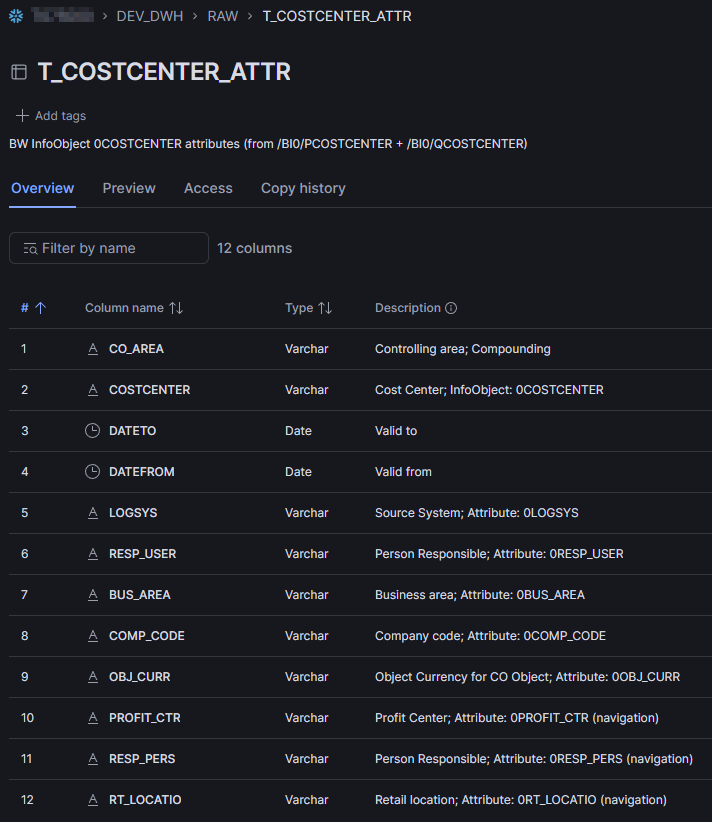
The dimension view on top returns every validity interval, exactly as BW stores them. A „current value only“ view would be easy to add, but that is a modelling decision, not a metadata question. The view inherits the column comments of the table, so the documentation travels with the data.
The text side follows the same pattern. The text table keeps BW’s language key and the short and medium texts. Because 0COSTCENTER has time-dependent texts, DATETO is part of its key as well.
CREATE VIEW VT_COSTCENTER
  COMMENT = 'Texts: Cost Center (0COSTCENTER), all languages; join to VD_COSTCENTER on CO_AREA, COSTCENTER, filter LANGU, match validity (DATEFROM..DATETO)'
AS SELECT CO_AREA, COSTCENTER, LANGU, DATETO, DATEFROM, TXTSH, TXTMD
FROM T_COSTCENTER_TEXT;
You may notice what is missing: foreign keys. In BW, the link between master data and texts is implicit; the system just knows. In Snowflake, a foreign key can only point to a table’s primary or unique key, not to a view, and the text table’s key does not line up with the attribute table’s key anyway. So the join is only described, in the comment of the text view above. Writing the actual join is left to the developer who builds on these views; the identical key column names make that easy.
Characteristics with a reference
Some InfoObjects have no master data of their own. They reference another InfoObject and borrow everything from it: data type, attributes, texts. Typical examples are the partner cost center 0PART_CCTR, which references 0COSTCENTER, or a planning year that references 0CALYEAR.
In BW, a referencing characteristic has no master data tables. Copying the referenced tables into Snowflake would duplicate data and invite inconsistencies. So Snowblower does what BW does: the referencing characteristic gets no tables, just a thin alias view over the referenced object’s view, with the key column renamed. The review already tells you so.
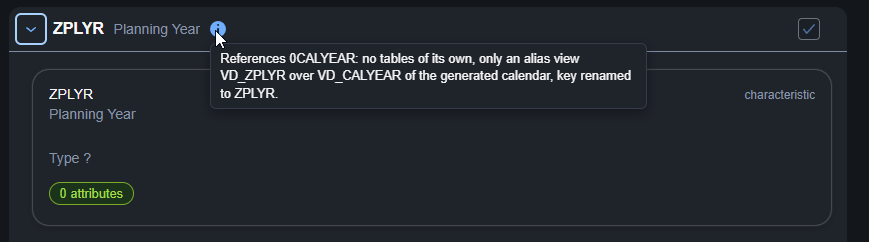
For the planning year ZPLYR, which references 0CALYEAR, this is what Snowblower generates:
CREATE OR REPLACE VIEW VD_ZPLYR (
  ZPLYR COMMENT 'Planning Year; InfoObject: ZPLYR; references 0CALYEAR'
) COMMENT = 'Dimension: Planning Year (ZPLYR); alias of VD_CALYEAR (0CALYEAR, generated calendar), key CALYEAR renamed to ZPLYR'
AS SELECT
  CALYEAR AS ZPLYR
FROM DEV_DWH.CORE.VD_CALYEAR;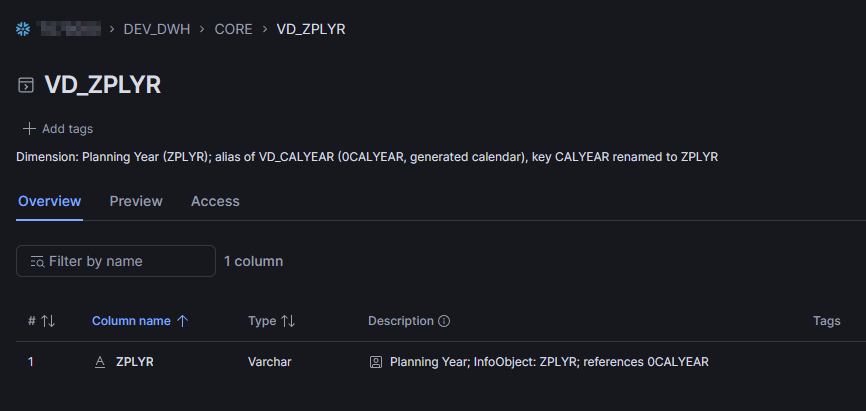
Note the „Type ?“ in the review screenshot: BW does not send a data type for a characteristic with a reference at all – the type belongs to the referenced object. So the alias takes the type of the referenced key, just as BW does.
One rule runs through the whole prototype: every characteristic column in a generated table has a VD_ view with the same key column name. A consumer who finds ZPLYR in a fact table can always join VD_ZPLYR on ZPLYR, no matter whether the values come from BW master data, from a reference or from somewhere else entirely.
This matters for time characteristics in particular: 0CALYEAR has no master data tables in BW either; BW simply knows what a year is. Where VD_CALYEAR comes from is part of the next article.
References to characteristics with master data follow the same pattern. The partner cost center 0PART_CCTR is a good example: its master data and texts are those of 0COSTCENTER. When you generate 0PART_CCTR, Snowblower looks up 0COSTCENTER as well. If it already exists in Snowflake – and the mapping table confirms it was generated from 0COSTCENTER – Snowblower offers to reuse it instead of generating it again.
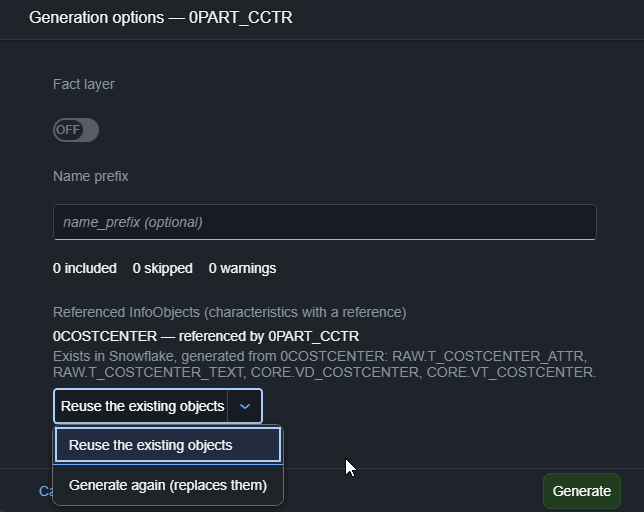
The result is two alias views and nothing else: VD_PART_CCTR over VD_COSTCENTER and VT_PART_CCTR over VT_COSTCENTER. The cost center key is renamed to PART_CCTR; the compounding parent CO_AREA keeps its name, so the partner cost center joins on the same controlling area as the cost center. All attributes, validity dates and texts come along unchanged – without a single copied row.
Traceability
If you generate hundreds of objects, you need to know where each of them came from. Snowblower writes one row per generated object and per column into a mapping table, BMU_META.OBJECT_MAP: BW system, BW object, BW table and field, Snowflake schema, object and column, naming rule version and timestamp.
For an InfoObject, this answers questions the DDL alone cannot. For example, which Snowflake columns come from the time-dependent Q table:
SELECT sf_object, sf_column, bw_field_name
FROM   DEV_DWH.BMU_META.OBJECT_MAP
WHERE  bw_object_name = '0COSTCENTER'
AND    bw_table_name  = '/BI0/QCOSTCENTER'
ORDER  BY sf_object, sf_column;
For 0COSTCENTER, that returns the validity dates and the time-dependent attributes such as company code, business area and profit center – both in the attribute table and in the dimension view on top of it. The time-independent attributes point to /BI0/PCOSTCENTER instead.
The same table is also where the joins live that Snowflake would not let us declare as foreign keys.
Takeaway
InfoObjects are where a BW model keeps most of its knowledge: keys and compounding, validity intervals, texts per language, references. All of it is in the metadata, and almost all of it can be generated. With Snowblower, an InfoObject becomes a documented set of tables and views in Snowflake, every column traceable to its BW origin.
What generation cannot do is make Snowflake think like BW. Primary keys are not enforced, joins are documented rather than declared, and a year has no master data unless somebody builds it. Those gaps are not bugs. They are the places where the Snowflake model needs explicit decisions that BW used to make for you.
In part 2 we put the InfoObjects to work: an ADSO becomes a Snowflake table, and we look at the characteristics BW has no tables for at all – the time characteristics.