In our first ZOCCER26 blog, we introduced ZOCCER26, our World Cup Prediction App, and showed how SAP Business Data Cloud, SAP Datasphere, SAP Analytics Cloud, and Seamless Planning work together to turn a football prediction game into a real business showcase.
That first article stayed at the architecture level. In this one, we open the hood on the part that actually makes ZOCCER26 a planning application: the moment a user submits a prediction.
Because in ZOCCER26, placing a bet is not a row inserted behind a custom web form. It is a planning entry which is written through SAP Analytics Cloud into a Seamless Planning model whose data lives directly in SAP Datasphere.
A Bet Is Just a Plan Entry
The most useful way to think about ZOCCER26 is to stop thinking of it as a game for a moment.
When a participant predicts that Germany (maybe) beats Paraguay 2:1, they are doing exactly what a planner does every quarter:
- They enter values for two measures (a home score and an away score)
- Against a specific member of every dimension (this user, this match, this version, this date)
- In an input-ready cell that is validated, locked at the right time, and written back to a governed data layer
Swap „home score“ for „revenue“ and „match“ for „cost center“, and you have a textbook planning data entry process. That is the whole point of the showcase and the reason we built the input on a planning model rather than a plain application table.
The Planning Model Behind the Bets
The heart of the input process is a compact, measure-based SAC model. Measure-based (rather than the classic account-based model) is not a stylistic choice: it is the prerequisite for Seamless Planning. Classic account models cannot be used currently.
Measures (Kennzahlen)
| Measure | Type | Meaning |
|---|---|---|
HT_BetScore | Decimal | Predicted goals for the home team |
AT_BetScore | Decimal | Predicted goals for the away team |
Two measures are all we need for the input itself. Everything else like points, ranks, hit/miss logic will be derived downstream, not typed by the user.
Dimensions
| Dimension | Role in the model |
|---|---|
Version | Holds the bets in the public.Plan version, kept separate from the actual match results (loaded into Datasphere via API). The special version dimension every planning model requires. |
Date | The standard time dimension. |
Zoccer_User | One member per participant, the „who“ of every bet. |
Zoccer_Match | One member per fixture of the tournament, the „what“ of every bet. |
Bet_State | Distinguishes a genuinely placed bet (Bet) from a score that only exists because the model was initialized (Init). |
Zoccer_User and Zoccer_Match are public dimensions, which matters for Seamless Planning: apart from the special Date and Version dimensions, only public dimensions can be used, and shared public dimensions must live in the same SAP Datasphere space. That constraint shaped how we set the model up from day one.
A small but honest detail worth flagging for anyone building something similar: SAC automatically adds the unassigned # member to every public dimension. So the member counts you see in the modeler are always „your data plus one“. It is easy to trip over when you validate row counts against the tournament schedule.
The 0:0 Problem: Why Bet_State Exists
Bet_State looks trivial next to the other dimensions, but it solves a very real planning problem. One that anyone who has ever built an input form will recognize.
A prediction of 0:0 is a perfectly valid bet. But 0:0 is also exactly what the model looks like before anyone has touched it, because initialized cells default to zero. Without a marker, we could never tell a confident „it’ll be a goalless draw“ from a user who simply never opened the app.
So every score carries a state: Init for the value that exists only because the model was initialized, and Bet for a value the user actively entered and confirmed. Scoring only ever considers records flagged Bet. It is the football equivalent of the classic planning question. Is this a real zero, or just an empty cell? And it is worth designing for from the very first day.
Why Seamless Planning, Not Classic SAC Planning
With classic SAC planning, the bets would be stored inside SAC, and we would have to export or replicate them to make them usable anywhere else. For scoring, for the leaderboard, for reporting.
Seamless Planning removes that step entirely. The principle is a clean division of labor:
- SAC owns the experience and the logic. The model definition, the input forms, versions, data actions, and calculations all stay in SAP Analytics Cloud, exactly as SAC users expect.
- Datasphere owns the data. When the model is activated, the fact table and dimension tables are generated directly in the chosen Datasphere space. Every bet a user types is persisted there. No import, no export, no replication.
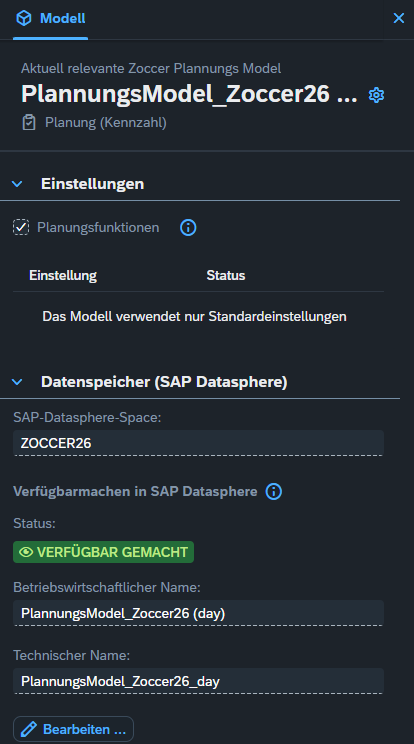
You can see this directly in the model settings. Our planning model PlannungsModel_Zoccer26 is enabled for planning on a measure (Planung (Kennzahl)) and points its data storage at the SAP Datasphere space ZOCCER26. The status „Verfügbar gemacht“ (exposed) confirms the model is available in Datasphere under the technical name PlannungsModel_Zoccer26_day. Which is exactly what makes the bets reusable for scoring and reporting downstream.
And here is the other side of the same coin. We did not build this table by hand — activating the SAC model created it automatically in the Datasphere space. In the Data Builder it shows up as a local table with semantic usage Fact, the technical name sap.sac.PlannungsModel_Zoccer26_day, and every column from the model: Zoccer_User, HT_BetScore, AT_BetScore, Bet_State, Version, Date, and Zoccer_Match. The bets are stored under the public.Plan version, and you can read a user’s predictions straight out of the table.
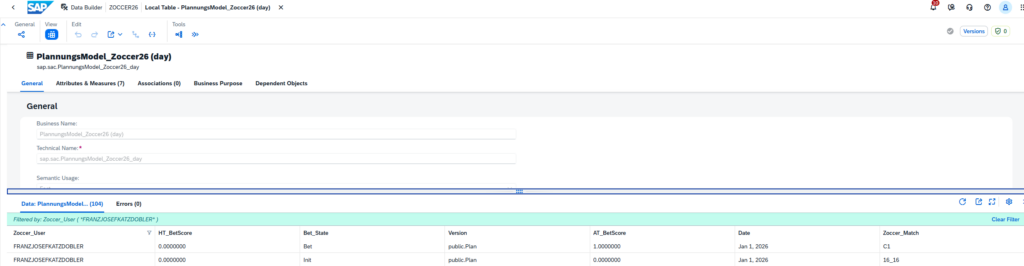
This screenshot also makes the Bet_State idea tangible: the first row is a real prediction (a Bet), while the second is a 0:0 that only exists because the model was initialized (Init). More on that below.
For ZOCCER26 this is the decisive part. The instant a participant submits a prediction, that prediction is already sitting in Datasphere as governed fact data, right next to the official match results we integrate there. The scoring logic can compare prediction against actual on the same data foundation, and the leaderboard reads from that same layer. One version of the truth, no reconciliation, no nightly sync. The reporting changes in real time as we implemented the logic for the scoring points in Datasphere without the need of additional data loads. Instead, we used different types of views and tools inside Datasphere.
It is worth remembering the setup this relies on: an SAC tenant on SAP HANA Cloud, SAC and Datasphere in the same data center with the same identity provider, and a 1:1 connection between the two. Those requirements are exactly why Seamless Planning is also considered a foundational building block on the road to SAP Business Data Cloud.
The Input Experience
From the participant’s side, none of the above is visible. The input runs in a purpose-built SAC Story: users open it and see a clean, table-style form — one row per upcoming match, columns for the home and away prediction, and a place to type. SAC is suitable to build complex applications and it gives us the control we need over how bets are entered, validated, and confirmed.
A few things happen quietly behind that simple screen:
- Everyone sees only their own bets. Users plan on their own
Zoccer_Usermember, so the input form is personal even though all bets share one model. - Bets lock at kick-off. Predictions can only be entered while a match is still open. Once a fixture starts, its cells are no longer input-ready — the equivalent of a planning deadline on a submission window.
Bet_Stateseparates real bets from noise. As soon as a user actively confirms a prediction, its state flips fromInittoBet. That flag is what tells scoring which0:0was a genuine call and which is just an untouched cell.- Bets live in a dedicated version. Predictions are captured in their own version, cleanly separated from the actual match results used to evaluate them.
Because the model is measure-based and lightweight, the input stays fast and unfussy — which, for a game people play from their phones between meetings, is the entire user requirement.
From Input to Points
Once a bet is written back, the planning model has done its primary job, and the Seamless Planning setup pays off a second time.
The predictions now sit in Datasphere as fact data, flagged Bet and ready to be evaluated. The official match results arrive on the same layer — loaded into Datasphere through an API integration, which is a story in its own right and gets its own blog in this series. With bets and actuals side by side, the scoring runs as logic in Datasphere rather than as SAC data actions. We deliberately pushed the business logic down to the data layer, and we wrote up the reasoning and the trade-offs in a dedicated article: ZOCCER26 – Architectural Approaches for Business Logic with Seamless Planning.
The user typed two numbers and confirmed them. Everything after that — scoring, ranking, dashboards — happens on data that never left the platform.
A Few Things Worth Knowing
Seamless Planning is genuinely elegant, but it is a young capability, and building ZOCCER26 surfaced a handful of details we would tell any team to plan for:
- Public dimensions only. Aside from Date and Version, plan your dimensions as public from the start, and keep shared dimensions in the same Datasphere space. Retrofitting this later is painful.
- Hierarchies defined in SAC are not exposed to Datasphere in a way that Datasphere can work with it directly. If you need hierarchical structures for downstream modeling or reporting, expect additional modeling in Datasphere. We will post an approach for this requirement in a different blog coming soon.
- Authorizations are not automatically symmetric. SAC data-access restrictions apply to what users see in SAC. Direct access to the same data in Datasphere needs its own data access controls (DAC), kept in sync. For a game with 70-plus participants each owning their slice of the fact table, thinking this through early is essential.
- The
#member is always there. As noted above, validate counts with the unassigned member in mind.
None of these are blockers. They are simply the shape of the technology today, and knowing them turns a frustrating week into a smooth setup.
The Same Pattern, Scaled to the Enterprise
Strip away the football, and the input we built for ZOCCER26 is the same input pattern enterprises run every planning cycle:
| ZOCCER26 Bet Input | Enterprise Planning Input |
|---|---|
| User enters home/away score per match | Planner enters values per account and cost center |
| Input locks at kick-off | Input locks at the submission deadline |
Bet_State flags a real bet vs. an initialized zero | Status flags a submitted plan vs. an empty cell |
| Bets persist directly in Datasphere | Plan data persists directly in Datasphere |
| Points scored against official results | Plan compared against actuals |
A prediction game simply makes the mechanics fun to look at. The architecture underneath is the one we would put in front of a finance, sales, or workforce planning team without changing a single principle.