Part 1 of 7 · Series index · Next: Docker and Security
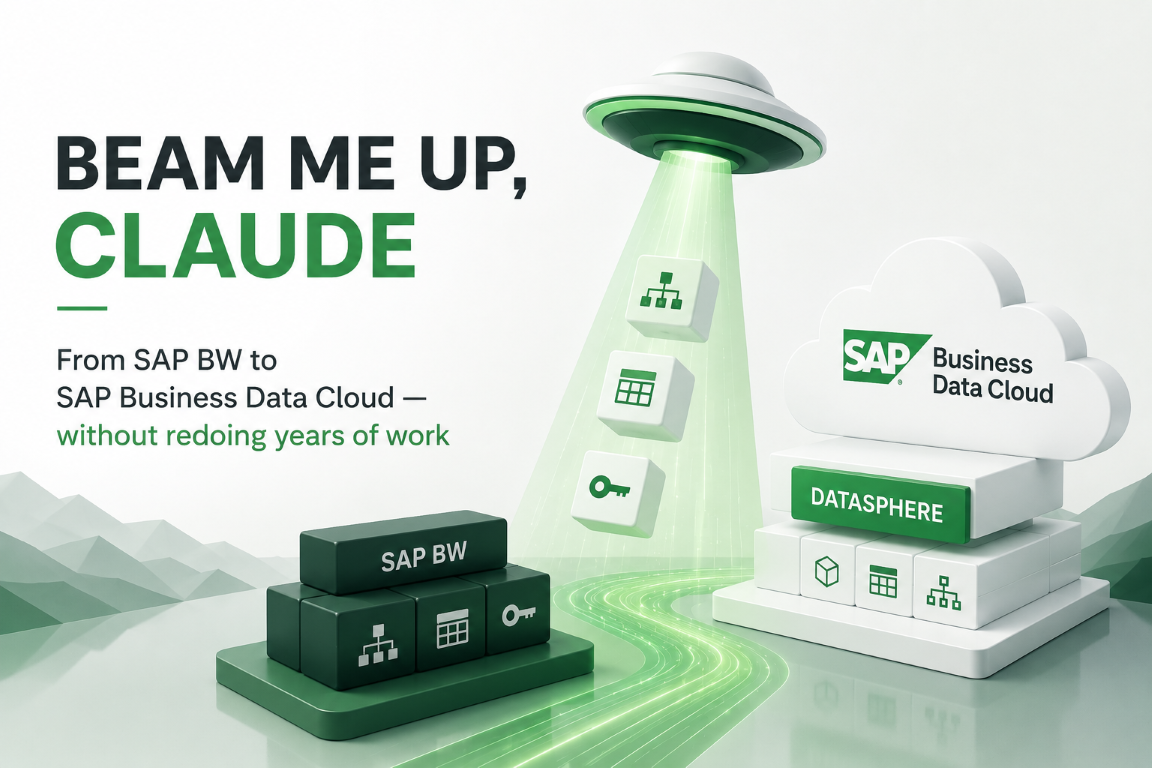
A company’s BW models took years to build. Moving them to SAP Business Data Cloud shouldn’t mean suffering through all that work again. Here’s how we taught a tool to do it — automatically, deterministically, and without ever handing a password to an AI.
TL;DR: you can read the modelling a company already built in SAP BW straight out of the system and regenerate it as ready-to-use SAP Datasphere models — deterministically, without storing a single credential, and without an AI improvising in the middle. The whole point is to protect the years of investment already sunk into BW, not to suffer through building it all again. And the generated objects are loading-agnostic: you fill them from BW, from S/4HANA, or from somewhere else entirely — that stays a separate decision.
First, what this is — and isn’t: a showcase. It’s a working proof of concept we built to demonstrate the approach (and what spec-first, AI-assisted engineering can produce), not a packaged product we license or sell. With that out of the way: we see it as complementary to SAP’s own Business Data Cloud tooling, not a competitor to it. For systems already lifted to the cloud, SAP offers data products from S/4HANA and a Data Product Generator on the BW/4HANA side; we do the equivalent for on-premise systems — and we go one step further by also generating the semantics (associations, texts, time-dependency such as valid-from / valid-to) that the data-movement tools tend to leave you to build by hand. This post walks through what we set out to do, the two rules we refused to break, and the shape of the thing we ended up with; the posts after it take one piece apart each, and a final one steps back to where this fits in the BDC world.
The investment nobody wants to suffer through again
Plenty of organisations have spent years building the foundations of their reporting in SAP BW. Every business concept lives there as a reusable building block that SAP calls an InfoObject — “Cost Center”, “Profit Center”, “Material” — and each one quietly carries a lot of hard-won detail: its key, its descriptive attributes, the texts and names that belong with it, and — the trickiest of the lot — the hierarchies that roll it up (a cost center sits in a department, which sits in a division, which sits in a company code).
That last one is where the real work hides. Keys, attributes and texts carry over to Datasphere cleanly enough, but hierarchies are the part everyone underestimates — and, in our experience, the single biggest pain to rebuild on the new platform. BW hands you rich, ready-made hierarchies: multi-level parent-child rollups, often time-dependent (valid-from / valid-to), sometimes versioned. Datasphere has no one button that recreates them. Doing it by hand means modelling the parent-child structure, wiring up the hierarchy view, getting the node-and-leaf semantics right, and handling the validity dates — and then repeating all of that for every InfoObject that has a hierarchy. It’s fiddly, easy to get subtly wrong, and exactly the kind of detail that quietly sinks a “we’ll just redo it in the new tool” plan. So it’s the part we cared most about getting right automatically.
Now the move is to SAP Business Data Cloud (BDC) — and specifically its Datasphere modelling layer. If your BW is already lifted to the private cloud, SAP gives you tooling for this (data products, the BW Data Product Generator). If you’re still on-premise, those aren’t options yet — which leaves two routes: re-create everything by hand, or use something like this. The hand route is the obvious one, and also the worst: redoing it screen by screen, one field at a time. It’s slow, it’s easy to get subtly wrong, and it throws away an investment that took years to earn. That was the itch worth scratching.
What we actually built
In plain terms: you pick an InfoObject, the tool reads everything BW knows about it, lets you review what it extracted, and then produces a finished Datasphere model you can import — or push to the cloud automatically. At its heart is a deterministic CSN generator: it turns that BW metadata into a CSN model (Datasphere’s import format) — the local tables, the dimension/text/hierarchy views, the associations and keys — the same way every time (Part 4 is all about it). The whole thing runs on a single machine as a handful of small, deliberately isolated programs (Part 2 explains why “isolated” is doing a lot of work in that sentence).
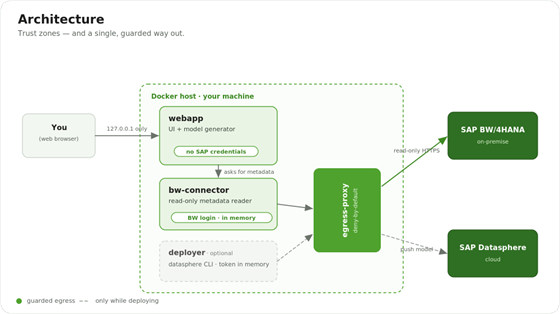
The overall architecture: you, a web app on your machine, an MCP BW connector that reads SAP BW, an egress gate, and an optional deployer that pushes to SAP Datasphere.
You talk only to a web app on your own machine. The web app never touches SAP directly; it asks a small MCP BW connector to read metadata out of SAP BW. Every outbound connection is forced through one egress gate that allows only the two destinations the tool actually needs. An optional deployer pushes the finished model to SAP Datasphere — and it only runs when you’re deploying. Note where the credentials live (in memory, never on disk) and what each piece is allowed to reach.
Why it pays off
The business case is simple. Years of modelling in SAP BW are real money on the books, and rebuilding it in Datasphere by hand is slow, expensive, and easy to get subtly wrong. This tool turns that into a short, repeatable routine: the same model every time, ready to audit, produced without your business data ever passing through it and without waiting on a cloud migration to start. You protect the investment, you cut the manual effort, and — because the tool only ever reads metadata and keeps no secrets — you take on very little new risk to get there. That risk question turned out to matter more than we expected, which is why security shaped the whole design; the full story is Part 2.
Two rules we never broke
Almost every decision in this project traces back to two rules we set on day one and then refused to bend.
Rule one: credentials never leave the box that needs them. Your BW login lives only in the connector’s memory, only while the tool is running — never in a file, never baked into the software, never in a log, and never visible to an AI assistant. The cloud token for Datasphere gets the same treatment. Restart the tool and you log in again — and if you run it as an always-on service, the in-memory login simply persists for the life of that process, so you don’t even do that until it restarts. That’s not an inconvenience; it’s the feature.
Rule two: everything between BW and the finished model is plain, repeatable code — no AI guessing in the middle. The translation from “what BW says” to “what Datasphere needs” is done by ordinary logic that produces the same answer every time. Same input today and next month, byte-for-byte identical result. That makes the output auditable in a way an improvised model never could be.
The journey, end to end
From where you sit, the tool is a short, linear trip with one deliberate pause for human judgement.
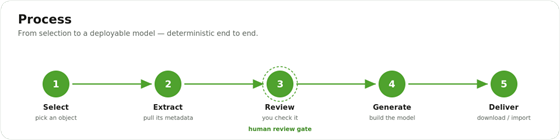
The five-step pipeline: Select, Extract, Review, Generate, Deliver — with Review marked as the human gate.
The five-step pipeline: Select, Extract, Review, Generate, Deliver — with Review marked as the human gate.
You select a concept from a search box. The tool extracts everything BW knows about it. You review that — the one human gate, your chance to catch anything odd before it spreads. Once you’re happy, the tool generates the Datasphere model and checks it as a whole. Then you deliver it: download it to import by hand, or push it straight to the cloud.
What we deliberately left out
It’s worth being clear about the boundary. The tool generates the structure — the tables, views, relationships and keys that mirror your BW concept in Datasphere. It does not move the actual data. How the rows eventually flow into those tables is a separate decision, kept firmly out of scope so the generated structure stays independent of how it’s loaded. The options we foresee for that loading step: SAP’s Data Product Generator or data products (for lifted systems), Datasphere replication flows, S/4HANA data products, or plain file loads — the generated structure doesn’t care which you pick, which is exactly what lets one model serve whichever approach a customer chooses later.
How we built it — spec-first, agentic engineering
One more thing worth saying up front, because it shaped everything above: we didn’t build this alone. We built it with Claude Code as an engineering partner — an approach increasingly called agentic engineering, where an AI agent doesn’t just autocomplete lines but plans, drafts, and revises whole components under close human direction. We worked spec-first, too: a deliberately large planning phase before a single line of product code was written. The bet was that an hour spent agreeing what to build and why saves a week of building the wrong thing securely.
That planning phase did double duty. We’ll be honest: we didn’t start as container experts — the Docker and network-isolation thinking in Part 2 was new ground — so we used Claude to learn it, alongside MCP and the rest, turning “what does this even mean?” into a working mental model far faster than reading specs alone. Then we put that understanding to work in loops: propose a design, have the AI poke holes in it, tighten it, repeat — deliberately hunting for the most secure approach that didn’t cost us convenience or functionality. Most of the decisions in this series — one box per credential, read-only by construction, deny-by-default egress, secrets only in memory — were forged in those loops, not bolted on afterwards.
And note the line we drew, because it’s exactly the line Rule two draws: an AI helped us design and build the tool, but no AI sits in the running tool’s path from BW to model. The agentic engineering happened at the workbench; the showcase stays plain, deterministic, and auditable. Using an AI to build something is not the same as letting an AI run it.
The road ahead
That’s the map. Each of the next six posts can be read on its own:
Part 2 — Docker and Security: why we split the tool into several locked-down pieces, and the day the web app lost its internet access on purpose.
Part 3 — The MCP BW Connector: reading SAP’s metadata through a component that physically cannot change anything — exposed as a tiny MCP tool surface — and the detective work it took to find the right calls.
Part 4 — The CSN Generator: turning messy source metadata into one clean Datasphere model, the same way every time.
Part 5 — The Web App: an SAP-looking interface — built from SAP’s UI5 Web Components — that can’t reach the internet, and the bug that proved it.
Part 6 — Deploying to Datasphere: the last mile — importing the model by hand (the common path) or letting SAP’s command-line tool push it automatically (optional), where that tool surprised us more than once.
Part 7 — From BW to Business Data Cloud: the bigger picture — where this tool fits now that Datasphere ships inside BDC, and why it complements SAP’s own migration tooling rather th