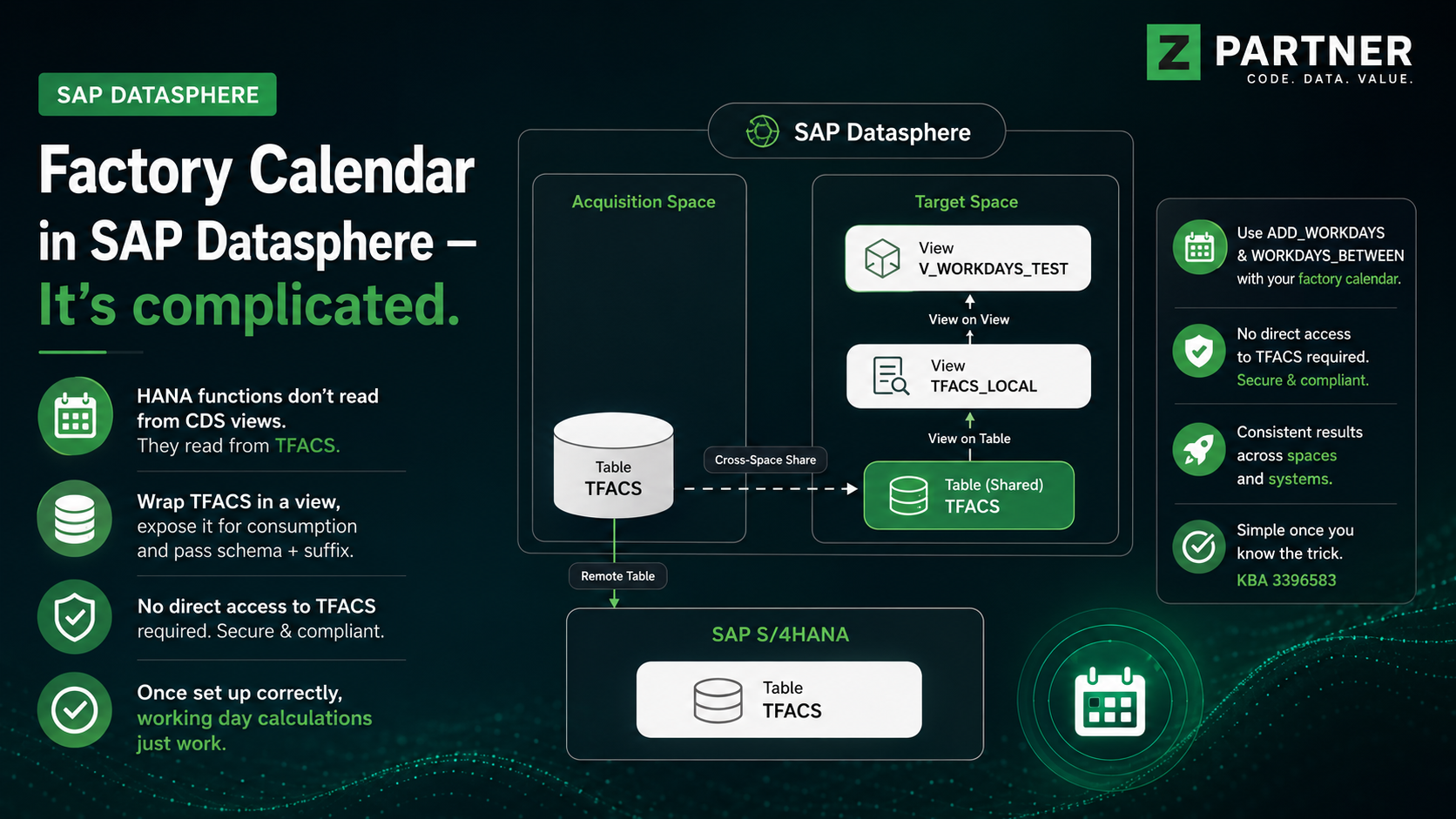
If you want to calculate working days in SAP Datasphere using the HANA SQL functions ADD_WORKDAYS or WORKDAYS_BETWEEN, your first instinct will probably be to reach for one of the SAP-delivered factory calendar CDS views — most likely I_FACTORYCALWORKINGDAYSPERYR, since it carries exactly the information these functions need. It won’t work. The HANA functions don’t read from a CDS view; they read from the underlying TFACS table directly, and in Datasphere you don’t have the privileges to do that. The fix, as described in SAP Knowledge Base Article 3396583, is to wrap TFACS in a view that is exposed for consumption and reference that view from the calculation.
This post walks through how we got there, what we tried, and what finally worked.
1. The Starting Point — We Need Working Days in Datasphere
In our model we needed the classic calendar calculations:
- “How many working days lie between date A and date B?” — i.e. WORKDAYS_BETWEEN
- “Give me the date that is N working days after date X.” — i.e. ADD_WORKDAYS
Both of these are standard HANA SQL functions, and they expect a factory calendar as input. So, the question became: where does the factory calendar actually “live” in Datasphere, and how do we point the functions at it?
2. The Obvious First Stop — The Factory Calendar CDS Views
SAP delivers a family of CDS views around the factory calendar. We started by reviewing the ones that looked relevant:
| CDS View | Purpose |
| I_FACTORYCALENDAR | Factory Calendar — the header / master entity |
| I_FACTORYCALENDARSPECIALRULE | Factory Calendar Special Rule |
| I_FACTORYCALENDARSTATISTICS | Statistics of Factory Calendar |
| I_FACTORYCALENDARTEXT | Factory Calendar — Text |
| I_FACTORYCALSPECIALRULETEXT | Special Rule for Factory Calendar — Text |
| I_FACTORYCALWORKINGDAYSPERYR | Factory Calendar Working Days Per Year |
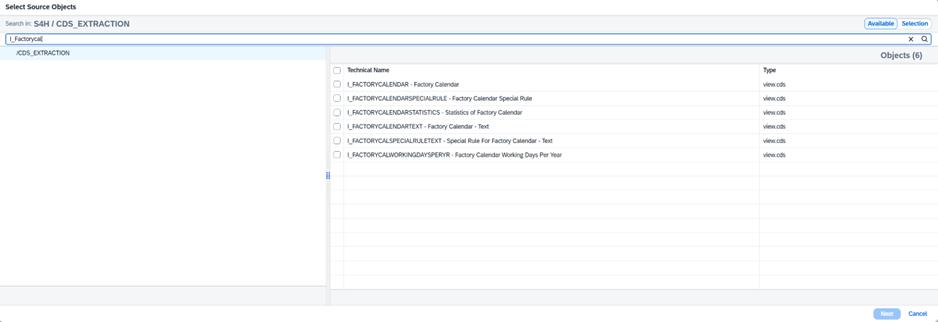
Of these, I_FACTORYCALWORKINGDAYSPERYR immediately looks like the right candidate when you have HANA functions in mind. It contains the per-year working day information — calendar ID, year, and the bitmask-like working day pattern — which is exactly what WORKDAYS_BETWEEN and ADD_WORKDAYS rely on under the hood. So, the natural plan was:
- Bring I_FACTORYCALWORKINGDAYSPERYR into our Datasphere space.
- Use it as the source for the working day calculation.
- Done.
3. The Plot Twist — The Functions Don’t Read from a CDS View
As soon as the calculation runs e.g. in the Analytic Model preview, Datasphere throws:
| The query executed with errors. Caught exception : exception 70002048: column store error: exception 334060: Could not read working days information from TFACS table „SPACE“.“TFACS“ – insufficient privilege: Detailed info for this error can be found with guid ‚xxxx‘ at Authorization/insuffPriv/impl/InsufficientPrivilegeThrow.cpp:343 |
A close cousin of this error, also documented by SAP, is the invalid table name variant:
| … Could not read working days information from TFACS table „SPACE#XXX“.“TFACS“ – invalid table name: Could not find table/view TFACS in schema [….] |
Real world example of one of the errors you would encounter if the setup is not 100% as described in the KBA.

All of these messages point at the same root cause, and it is the key insight of this whole story:
ADD_WORKDAYS and WORKDAYS_BETWEEN do not consult a view. They go straight to the TFACS table in the current schema (your Datasphere space).
No matter how neatly you expose I_FACTORYCALWORKINGDAYSPERYR, the HANA function won’t pick it up — it isn’t looking there.
So there go our naming conventions for views.
In a regular HANA system, the TFACS table is just sitting in the ABAP schema and the function finds it. In Datasphere, your space does not own a TFACS table, and even if a TFACS happens to be reachable, you don’t have the read privileges on it. Hence: insufficient privilege or invalid table name, depending on which way the lookup fails.
This is also why digging deeper into the CDS view family is a dead end. The CDS views are perfectly fine for reading or modelling factory-calendar data — but they are not what the SQL function reaches for.
4. Finding the Answer — SAP Knowledge Base Article 3396583
We only landed on the actual fix once we searched for the exact error text. That turned up *SAP KBA 3396583 — Error using ADD_WORKDAYS or WORKDAYS_BETWEEN function in Datasphere*** (Component DS-MD, released 02.05.2025).

The KBA prescribes a specific pattern: stop trying to read the standard CDS views and instead wrap TFACS in your own view inside the space, expose it for consumption, and tell the SQL function which view to use via the `<schema>` and `<suffix>` parameters.
The detailed recipe
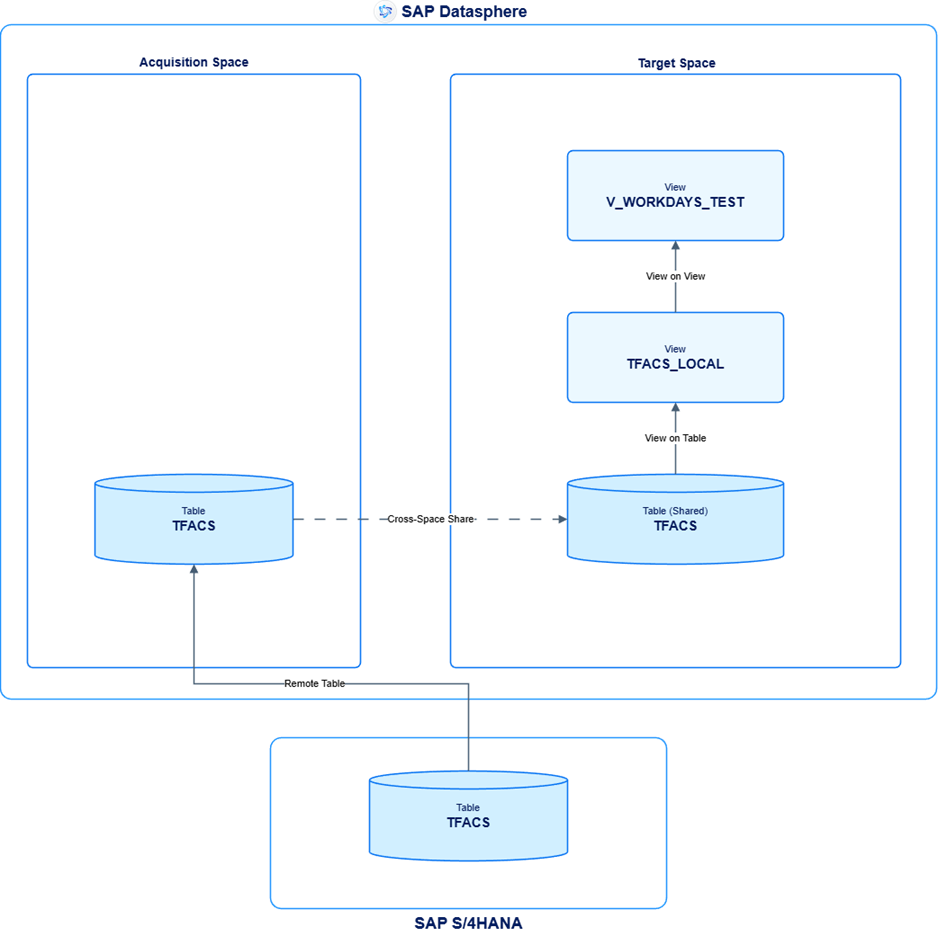
- Bring TFACS into your space. If TFACS originally lives in space A and you need it in space B, share it across.
- Create a wrapping view in the consuming space with these constraints: the source table inside the view is named TFACS; the columns of the view are renamed to match the technical column names of TFACS in the source system (they have to look like TFACS to the function); the view’s own name carries a suffix, e.g. TFACS_ABC. The function uses that suffix to find it.
- Mark the view as exposed for consumption.
- Reference it explicitly in your calculation by passing both the schema (space) and the suffix.
Example
If the wrapping view lives in space TEST and is named TFACS_ABC, the call becomes:
| ADD_WORKDAYS(’01‘, ‚2014-01-09‘, 1, ‚TEST‘, ‚_ABC‘) |
The first three parameters are the usual ones (factory calendar ID, base date, number of workdays). The added ‚TEST‘ and ‚_ABC‘ are what tell the function: don’t go looking for the raw TFACS table — use my exposed wrapper instead.
The same pattern applies to WORKDAYS_BETWEEN.
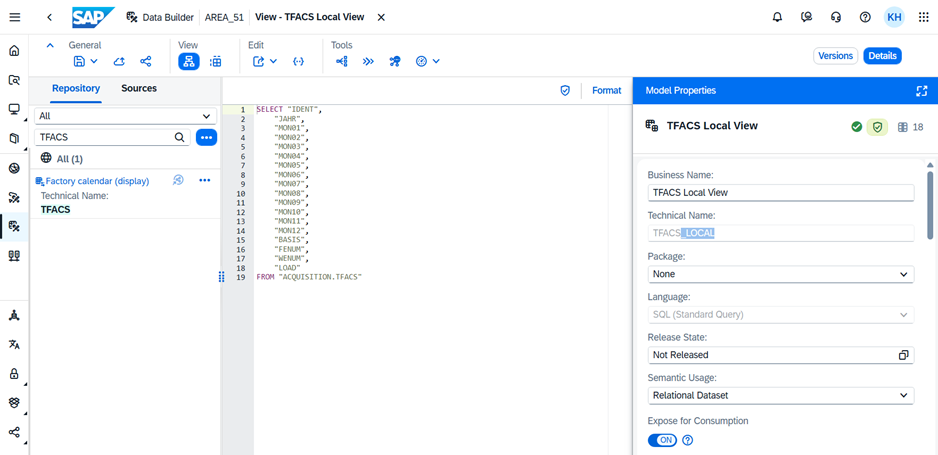
And if you did it all correctly, you will get this beautiful picture.

5. Why This Caught Us Out — Lessons Learned
A few takeaways worth keeping in mind for anyone walking the same path:
- The CDS view list is a distraction here. I_FACTORYCALENDAR, I_FACTORYCALWORKINGDAYSPERYR and friends are not wrong — they are simply not what the SQL function consults. If your goal is ADD_WORKDAYS / WORKDAYS_BETWEEN, ignore them and go directly to TFACS.
- The error message hides the real story. “Insufficient privilege” suggests a permissions ticket. “Invalid table name” suggests a missing object. Neither hint that the actual remedy is to expose a wrapper view and pass extra parameters to the function.
- Cross-space usage needs special care. If TFACS is in space A and the calculation lives in space B, share TFACS to B and build the TFACS_xxx wrapping view inside B. The wrapper must sit in the same space as the calculation that uses it.
- The suffix and schema parameters are not optional. They are what makes the function pick up your view instead of the raw table. Leave them out and you are back to the original error.
6. The clear picture
Now that was very straightforward, wasn’t it? To make the picture a bit clearer, let us have a look at an overview diagram.
7. Wrap-Up
The factory calendar in Datasphere is a small but instructive example of how an on-premises HANA pattern doesn’t always translate one-to-one into the cloud-modeled world. The standard CDS views are still useful for reporting and modeling factory calendar information, but for the SQL date functions, you must take the explicit detour through a TFACS_<suffix> wrapper view. Once you know the trick — and once you’ve found KBA 3396583 — the implementation becomes rather simple although not very straightforward.
References
- SAP Knowledge Base Article 3396583 — Error using ADD_WORKDAYS or WORKDAYS_BETWEEN function in Datasphere (Component: DS-MD, Version 5, released 02.05.2025)
- SAP Help — ADD_WORKDAYS Function (Datetime)
- SAP Help — WORKDAYS_BETWEEN Function (Datetime)
- SAP Help — Preliminary Currency Conversion in SAP Data Warehouse Cloud (referenced as “See Also” in the KBA)