Part 3 of 7 · ← Docker and Security · Next: The CSN Generator →
We needed to read everything BW knows about an InfoObject and expose it through a small, standard MCP interface. We expected one tidy request from SAP; we found the data scattered across two unrelated interfaces with no map between them — and the only way to learn the right calls was to eavesdrop on SAP’s own tool. Here’s that detective story, and why this component can read SAP but physically cannot change it.
The connector is the one piece of the tool that talks to SAP BW. It holds your BW login (in memory, as Part 2 explained) and does exactly one kind of work: answer questions about metadata, over a small standard interface called MCP. This post walks through the wrinkle SAP handed us, how we cracked it, and the two properties that make this a safe credential-holder.
A rule of thumb: keep the credential-holder small and dull
Before the story, the principle that shaped it. The component that holds your password should do as little as humanly possible — no model-building, no clever transformations, no user interface, just “you asked about a concept, here’s what BW says.” Every feature the connector doesn’t have is one less thing that can go wrong while it’s holding a credential. So we pushed all the interesting work elsewhere and left the connector a faithful, boring messenger. Boring, here, is the compliment.
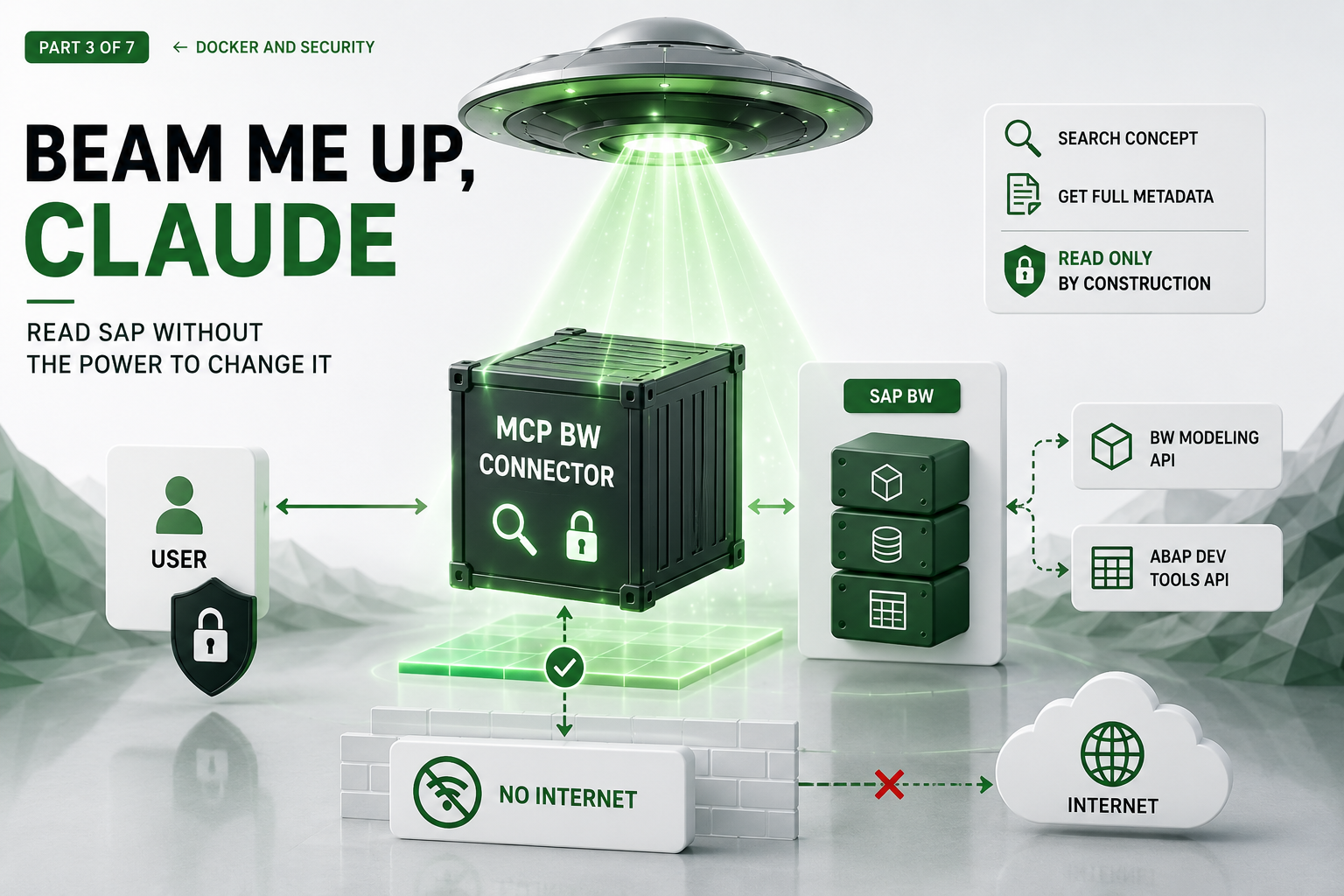
Concretely, it offers just two tools over MCP (the Model Context Protocol — a small, open standard for exposing named tools)1: one to search for a concept, one to fetch its full merged metadata. That’s the whole surface. And because it speaks MCP, it doesn’t even need the web app to be useful — you can run it on its own and talk to it locally over a stdio MCP connection, which is exactly how we exercise and verify it in isolation.
The obvious first stop — one request, surely
The plan looked trivial: ask BW for “InfoObject 0COSTCENTER” and get back everything about it. There’s a BW Modeling interface that describes the concept — its key, its attributes, its hierarchies — so we started there. And it gave us… half the picture. It knows the shape of the object but not the exact type and length of every underlying field. The bit you most need in order to rebuild something faithfully was simply not in that answer.
The plot twist — two APIs, one truth
It turns out the full picture of a single concept isn’t available from one place at all. It’s split across two completely separate interfaces on the same BW system — different addresses, different formats, no shared session, and certainly no diagram telling you how they relate.2
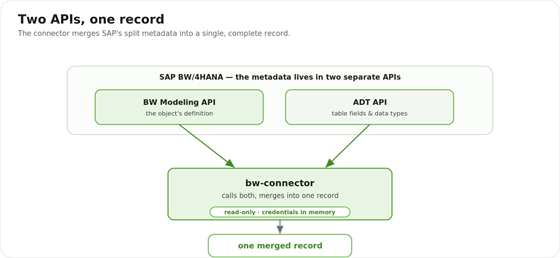
Two APIs, one truth: SAP BW exposes an object’s definition through one API and its table fields and data types through another; the MCP BW connector calls both and merges them into one record.
One API — SAP’s BW Modeling interface — describes the concept itself. A second, unrelated API — the ABAP Development Tools interface — knows the underlying table structures and the exact data type of every field. Neither one alone can answer “what exactly is a Cost Center, down to the type and length of every field,” so the connector calls both and stitches the answers into a single, complete record.
Finding the answer — eavesdropping on SAP’s own tool
SAP doesn’t publish a friendly “here’s how to read an InfoObject end to end” recipe, so we did the next best thing: we watched the experts. SAP’s own modelling tool, built on Eclipse, has a hidden communication log that records every request it sends to BW. We switched it on, clicked through a Cost Center’s properties exactly as a modeller would, and read the real conversation between the tool and the server line by line. The calls we needed, it turned out, were coming from inside the house.
That’s where the actual calls came from — every endpoint the connector uses was lifted from that genuine exchange and then re-checked against a live system. No guessing, no invented URLs, no “this header is probably right.” When the documentation is silent, the system itself will tell you the truth if you listen carefully enough. (It also saved us from a dead-end endpoint that looks useful and returns nothing of value — we only knew to avoid it because the real tool never called it.)
Read-only, by construction
Now the safety. The usual way to make something read-only is to configure it that way — leave the “write” buttons switched off. We did something stronger: the connector’s code has no way to write at all. The capability isn’t disabled; it was never built. There’s no code path that could change anything in BW, so there’s nothing to misconfigure your way past. The worst a bug — or a compromised connector — could do is read metadata it was already allowed to read.
No password-shaped tool to trick
The two tools above are the connector’s entire surface. Handling your login is deliberately not one of them — credentials arrive through a separate, private channel and are never something the tool surface can hand back.
This matters for the future. Because the connector speaks MCP, an AI assistant could one day connect to the same two tools the web app uses today. If that happens, the only things it can see are “search metadata” and “read metadata.” There’s no “give me the password” tool sitting there waiting to be talked into misbehaving. We get an AI-ready interface for free without ever putting a credential within its reach.
Least privilege on the SAP side, too
The container design limits what our code can do. A second layer limits what anyone holding the login can do — including an attacker who somehow got it. The recommendation is a dedicated technical user in BW with a tightly scoped, display-only role: it can read metadata but never the actual data, it can’t open an interactive SAP session (so a stolen login can’t be used to sit down at the system), and it’s restricted to exactly the few services the tool touches.3 At every layer the message is the same: this tool looks, it never touches.
What it’s built from
No exotic stack here, on purpose. The connector is plain Python — easy to read, easy to audit, easy to verify line by line — exposing those two capabilities over MCP, the same open protocol a growing number of AI tools already speak. Plain code plus a standard interface means you don’t have to take our word for what it does: you can read the source, and you can point any MCP client at it and watch exactly which calls it makes.
Lessons learned
- When the docs go quiet, watch the real client. The communication log turned a week of guesswork into an afternoon of certainty.
- “Read-only by construction” beats “read-only by config.” If the dangerous code path doesn’t exist, it can’t be re-enabled by accident.
- Keep the secret-holder dull. Every feature you don’t add to it is a risk you don’t take.
- A small, single-purpose box is a reusable one. Holding no app logic and speaking a standard protocol, the connector can be lifted out and reused on its own — by another app or an AI assistant — without dragging the rest of the tool along.
- Design for the AI you might add later by making sure the only tools on offer are safe ones — not by trusting the AI.
Wrap-up
The connector’s job ends with one merged, faithful record of what BW knows — raw, complete, and stamped with where it came from. It deliberately stops there. Turning that raw record into something clean and Datasphere-shaped is a different job, done by code that holds no credentials and needs no network — which is exactly where Part 4 picks up.
Related ZPARTNER reading