Part 2 of 7 · ← Project Overview ·
We split the tool into several locked-down pieces, gave each one exactly the access its job needs, and took the internet away from the part you actually use. That last move sounds like a limitation. It’s the single best decision in the design. Here’s how we got there.
In Part 1 we promised that credentials never leave the box that needs them. This is the post where “box” stops being a figure of speech — and where we explain why a long, scary security-scanner report turns out to mean very little here. This post walks through the obvious design we didn’t build, the layered one we did, and the plot twist the scanner threw at us near the end.
The threat landscape we built against
We didn’t harden this tool out of paranoia — we did it because the ground under software security has shifted, fast, and we were determined not to add to the problem. Three changes in particular shaped every decision that follows.
AI-written code ships vulnerabilities, at scale. The rise of “vibe coding” — prompting an AI and shipping what comes back — has quietly seeded codebases with flaws. Independent testing of more than 100 models found that roughly 45% of AI-generated code carried an OWASP Top 10 vulnerability, and the rate didn’t improve with bigger, newer models; meanwhile researchers have begun cataloguing real, published CVEs traced straight back to AI coding tools.1 The irony isn’t lost on us, because we built this tool with an AI partner (the “agentic engineering” from Part 1). That cuts both ways: an AI is a brilliant collaborator and a careless author at once, so everything it helped write had to survive plain human review and sit behind a deliberately small attack surface.
Supply-chain attacks have gone from rare to routine. A supply-chain attack slips malicious code in through a component you already trust — a library, a package, an update — rather than through your front door.2 Hundreds of thousands of malicious open-source packages are now published every year, and attackers increasingly treat the public registries as a delivery channel rather than an afterthought. The xz Utils backdoor (CVE-2024-3094) came within a whisker of slipping a hidden SSH key into countless Linux servers through one compromised dependency.
The case that hit closest to home is Shai-Hulud — the first npm worm that spreads on its own. Once it lands, it scans the machine for credentials and tokens, exfiltrates them to attacker-controlled repositories, and then republishes itself through every package it can reach, so one stolen token quietly becomes hundreds of poisoned releases. A follow-up wave, “Mini Shai-Hulud,” aimed squarely at SAP’s own published npm packages — the CAP and MTA developer ecosystem — running its payload from a preinstall script that fires the moment you npm install, before most security tooling has even woken up.3 (Yes, it’s named after the sandworms in Dune; much as we loved Frank Herbert’s novels, we could happily have lived without these particular worms.) And no project is too humble to be a target: even an app as everyday as Notepad++ had its update channel hijacked by state-backed attackers to deliver a backdoor.4 Every dependency you pull in — and every update channel you trust — is a liability, which is half the reason the connector is plain Python and each box is kept as small as we could make it.
Even SAP gets hit. This is not someone else’s problem. Beyond those npm packages, in 2025 a critical SAP NetWeaver flaw (CVE-2025-31324, CVSS 10.0) let unauthenticated attackers upload a webshell and seize control of the host — and it was actively exploited in the wild, against exactly the kind of estates this tool connects to.5
So the brief we set ourselves was blunt: shrink the attack surface, keep no secrets at rest, and assume any single layer can fail. Everything below — the separate containers, the egress gate, the in-memory-only credentials — is that brief turned into a design.
The starting point: the tempting single program
The simplest way to build this tool is one program that logs into BW, reads metadata, builds the model, and pushes it to the cloud. We know, because that’s exactly what we built for the first iteration — and then deliberately pulled apart, for the reason that follows. It would also be the most dangerous thing we could ship: that one program would hold every credential, could reach every system, and a single flaw anywhere inside it would expose all of it at once. Convenient to write; a terrible thing to trust.
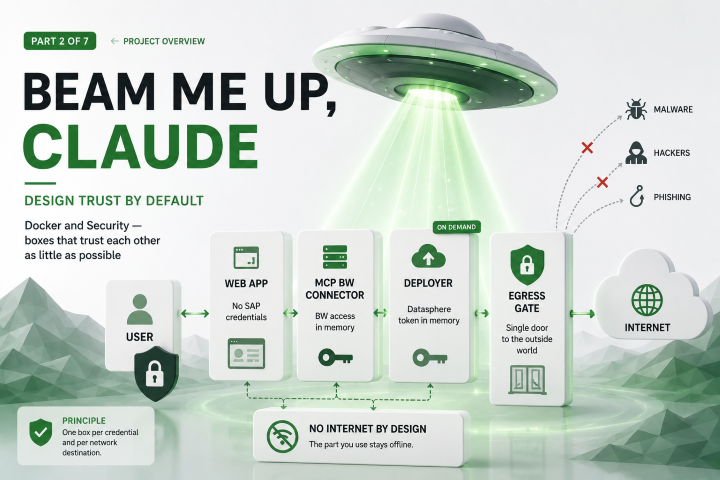
So we split it into separate Docker containers. A container is a lightweight, isolated box that runs one program with only the files and network access you explicitly hand it. None of this is everyday territory for an SAP BI consultant — containers, egress proxies and threat models are a long way from InfoObjects and queries, and the learning curve was steep; we’re sharing the reasoning precisely because it wasn’t obvious to us when we started. The rule we used to decide where to draw the lines was deliberately boring: one box per credential and per network destination — not one box per feature.
That gives four working pieces: a web app (the only screen you see, holds no SAP credentials at all), an MCP BW connector (holds your BW login in memory, the only piece allowed to talk to BW), an optional deployer (holds the Datasphere token in memory, the only piece allowed to talk to the cloud, and only runs when you’re deploying), and an egress gate (a tiny gatekeeper that is the single door to the outside world).
A side benefit of drawing the lines this way: each box is a small, single-purpose image with no hidden dependencies, so it’s easy to reason about, to reuse, and to scale on its own. The connector and the deployer are self-contained services in particular — you could run more than one, or lift one out and reuse it elsewhere (the connector already speaks MCP, so an AI assistant or another application could call it) — without dragging the rest of the tool along.
The component that refused to become a box
There’s a fifth piece — the part that actually builds the Datasphere model (Part 4) — and we deliberately did not make it a container. It holds no credentials and needs no network; it just takes tidy metadata in and produces a model out. Wrapping it in its own box would add moving parts and attack surface for exactly zero security benefit. Boxes are for things that hold secrets or reach the network. This does neither, so it stays a plain library. Resisting the urge to “containerise everything” is itself a security decision.
Who can reach what
The headline property is easiest to see as a picture.
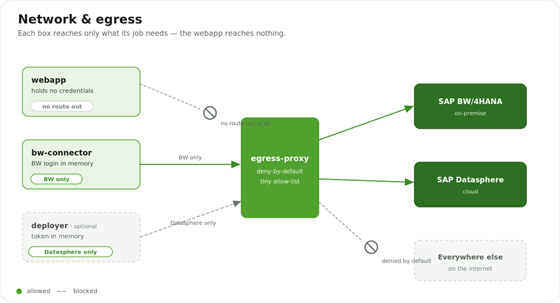
Network topology: the web app has no route out, the MCP BW connector may reach only SAP BW, the deployer may reach only SAP Datasphere, and everything else on the internet is denied by default.
Every outbound connection is forced through the egress gate, which denies everything by default and allows only a tiny list. The connector may reach SAP BW and nothing else. The deployer may reach SAP Datasphere and nothing else. And the web app — the one piece you actually interact with — has no route out at all. The rest of the internet simply isn’t reachable.
That last point is the one we’re proudest of. The web app cannot reach the internet. If it were ever compromised, it has no credentials to steal and nowhere to send them — it can’t phone home, can’t pull down a second-stage attack, can’t quietly ship your metadata anywhere. Taking away its internet access feels like a restriction. It’s the most valuable safety property in the whole design.
The hardening ladder
On top of “who can talk to whom”, every box is locked down the same way, in layers.
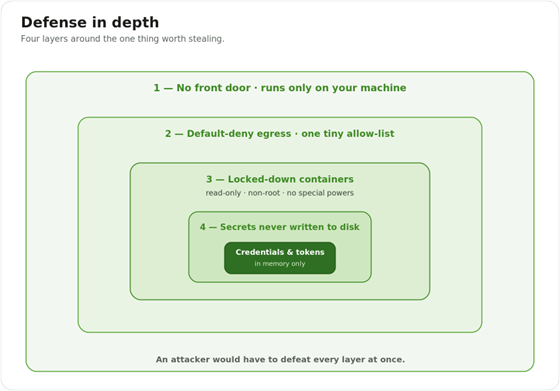
Defense in depth: four nested layers — no front door, default-deny egress, locked-down containers, and secrets never written to disk — wrapped around the credentials at the centre.
Think of it as an onion an attacker has to peel completely. The outer layer is that there’s no front door — the tool listens only on your own machine, so there’s nothing internet-facing for a stranger to even knock on. It contains the default-deny egress you just saw. Inside that, every container runs read-only, as an ordinary non-root user, stripped of special powers — so code that somehow ran couldn’t install tools, couldn’t become an administrator, and couldn’t survive a restart. And at the centre, the prize — credentials and tokens — is never written to disk at all, living only in memory for the length of the run.
Three tempting ways to leak a secret — all rejected
Most credential leaks happen long before any attacker shows up, through habits that feel convenient at the time. We ruled out the three usual suspects on purpose:
- Passwords in environment variables. Easy, but visible to anyone who can inspect the running container.
- Baking secrets into the software image. Those layers are permanent and effectively public to anyone who gets the image — the password outlives the project.
- Committing a credentials file to the code repository. The classic; the secret lands in version history forever.
Our answer is to need none of them at rest. You type your BW login into the web app, it’s passed once to the connector, and it lives in memory until you stop the tool. (For unattended runs there’s an opt-in fallback that reads a file kept outside the project and mounted into memory — never one of the three patterns above.) As a backstop, an automated scanner checks every change for an accidentally-committed secret.
The plot twist: “the scanner found dozens of vulnerabilities!”
Here’s the moment that catches everyone out. Run an honest security scan over the finished images and it lists known vulnerabilities — dozens of them, every day, even in a minimal image rebuilt this morning. Ours is no exception. The first time you see that report, it looks alarming.
The question that actually matters isn’t “are there known issues?” (there always are) but “can any of them be exploited here?” — and for this design the honest answer is: for practical purposes, no. The multi-box architecture is exactly why. Most of the flagged issues live in code our programs never run, so they can never be triggered. The handful that depend on a network connection can’t be reached, because the boxes can’t connect anywhere hostile. And even if one of those assumptions were wrong, the read-only, powerless, internet-less container leaves an intruder no room to move and nothing worth taking. Defense in depth means one failure isn’t enough — you’d need the code to be reachable and the network open and the box writable, and the design removes all three.
Lessons learned
- Draw container lines around secrets and network reach, not around features. It’s the rule that makes “blast radius” small.
- Removing capability beats adding controls. No internet, no disk writes, no root — there’s simply less that can go wrong.
- Small, single-purpose images pay off twice. The same split that shrinks the blast radius also makes each box easy to reuse and scale on its own — the connector and deployer can stand alone as services.
- A scary scan report isn’t a verdict. Reachability and blast radius are what matter; architecture is what shrinks both.
- Be honest about the boundary. This all rests on one assumption: one person, on their own machine, reachable only from that machine. The day it becomes a shared or internet-facing service, the “no front door” reasoning weakens and the assessment has to be redone — with proper encryption and real authentication added first. Until then, the right posture is accept and keep watching.
Wrap-up
So what can an attacker who fully owns the web app actually do? Read some SAP metadata — the shape of your cost centers, not the data and not the credentials. That’s the entire blast radius, and it’s that small on purpose. Next we’ll open up the one box that does hold a credential — the MCP BW connector — and show why it can read SAP but can’t change a thing.