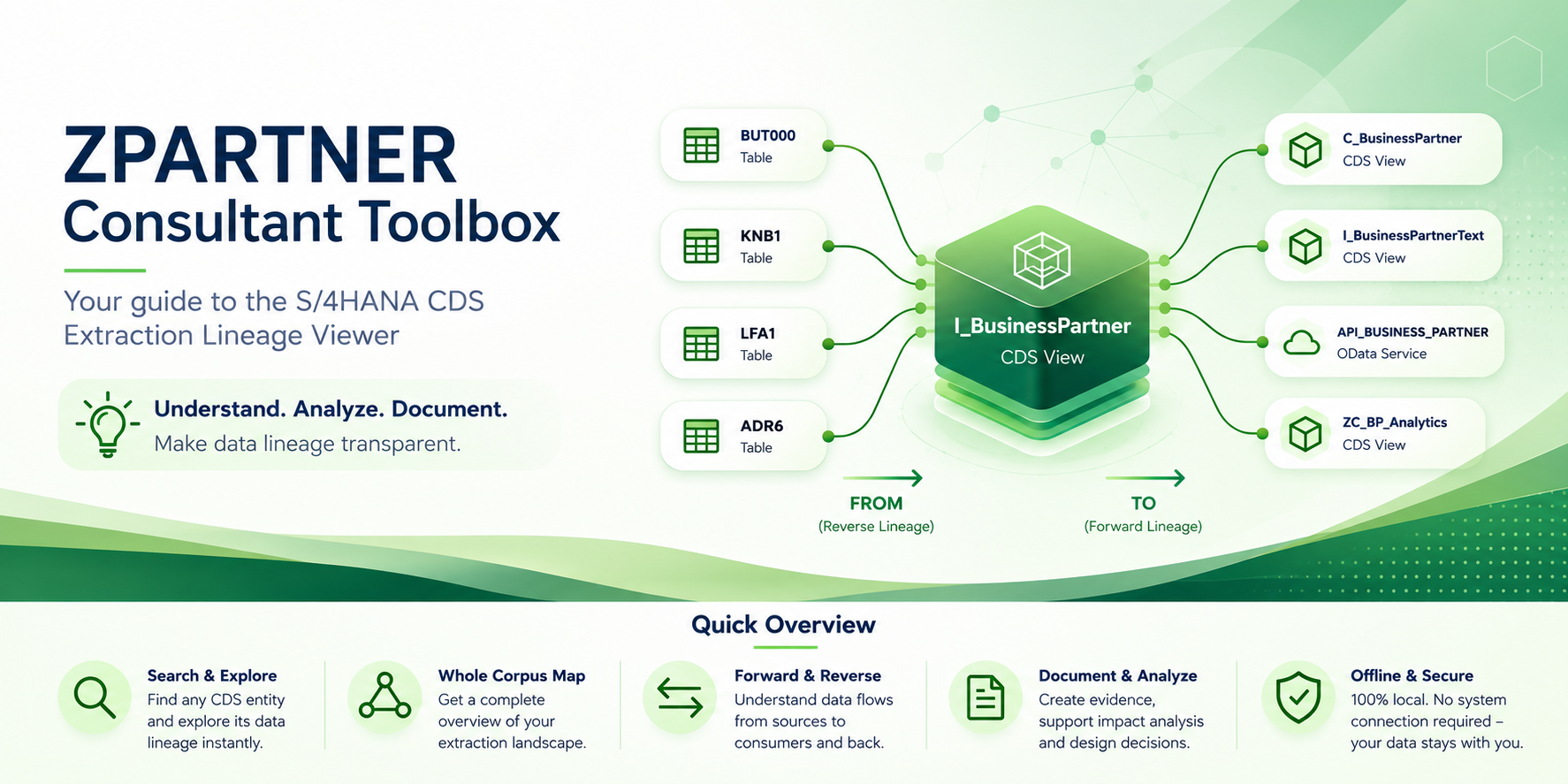
Business users, SAP consultants and analytics teams often describe the same business information using different terminology. The Consultant Toolbox Viewer bridges these perspectives by making SAP CDS lineage transparent—from business fields and transactions to CDS views and back again.
In this article
01 · The terminology gap
One business fact, several technical languages
Most data and analytics requirements do not begin with a CDS view name. They begin with the terminology that is already established in an operational process: a transaction used by a finance team, a familiar SAP field, a table known from previous implementation work, an existing report, or a broader business question such as “Which organizational unit owns this posting?”
That starting point is natural for business users and many SAP consultants. It reflects how work is performed in the source system. Analytics and data engineering teams, however, usually operate with a different vocabulary. They work with CDS views, CDS elements, associations, semantic names and extraction-enabled interfaces. A field that is obvious in a transaction may have a different name in a basic view, another representation in a composite view, and a stable semantic name in the extraction layer.
The difficulty is therefore not simply finding a table or locating a single view. The real task is to reconstruct the chain of meaning between business terminology and the technical model that exposes the data. Without reliable lineage, teams often depend on manual repository searches, personal experience, trial-and-error extraction tests, or documentation that covers only part of the path.
The Consultant Toolbox Viewer exists to make that chain inspectable. It presents CDS lineage as a navigable model, allowing a consultant to move from a business-facing entry point toward an extraction-enabled CDS view, or to start from a CDS artifact and trace the data back to its original SAP source. SAP Datasphere is an important destination for this analysis, but it is one use case within a broader requirement: understanding how business information is transformed through CDS layers.
Core purpose: The viewer provides a translation layer between operational SAP terminology and the semantic CDS model used by analytics, integration and extraction scenarios.
02 · Two primary use cases
Navigate from the requirement to CDS—and from CDS back to the source
Lineage analysis is most useful when it supports both directions. Consulting work rarely follows one fixed sequence. In one workshop, the starting point is a transaction and a field name. In another, a data engineer presents a CDS view and asks where a value originates. The same lineage model must support both questions without forcing the user to rebuild the relationship manually.
Direction A
Business requirement → CDS
Start with a transaction, field, table or business requirement and identify the extraction-enabled CDS view that exposes the required information. Inspect how the field is renamed and which CDS layers are traversed.
Direction B
CDS → origin
Start with a CDS view or CDS element and determine where the data comes from. Follow the lineage through intermediate views to the underlying tables and original SAP field.
Business requirement → CDS
This direction is typical during discovery and solution design. A stakeholder may identify a field in a transaction, reference a known table column, or describe a business value without knowing its technical implementation. The consultant needs to determine which CDS artifact provides that information in a form suitable for analytics or extraction.
The viewer helps answer several questions together: Which extraction-enabled CDS view contains the information? Under which semantic name is the field exposed? Which interface, basic, composite or consumption views lie between the source and the extractor? At which step does a technical field name become a business-oriented CDS element?
These questions are closely related. Selecting a view only because it contains a similarly named element can be misleading. The relevant result is the complete path that confirms the field’s origin and shows how it reaches the target interface.
CDS → origin
The reverse direction is equally important. A CDS view may already be used in an extraction, data product or analytical model, but its provenance is unclear. A data engineer may need to validate a value, explain an inconsistency, assess the impact of a source change, or document the technical origin of a semantic field.
Starting from a CDS view or element, the viewer exposes the intermediate layers, participating source objects and original SAP field. This makes it possible to distinguish a direct projection from a calculated or renamed element and to see whether several source paths converge in the same semantic artifact.
03 · The viewer
A lineage workspace designed for consulting analysis
The Consultant Toolbox Viewer is delivered as a self-contained HTML workspace. It combines search, filtering, relationship analysis and visual navigation in a single interface. Because the lineage data and interaction logic are packaged together, the file can be used in workshops, architecture reviews and project documentation without requiring a separate application stack.
The central interaction model is simple: choose an object or field, inspect its occurrences, and follow the relevant path. The value lies in the context around each match. A field name may occur in multiple tables or CDS views, and a CDS element may be projected through several branches. The viewer therefore supports selection at the level where a consultant can distinguish between similarly named objects before tracing the lineage.
Each transition in the graph represents a meaningful modeling step. A source table can feed a basic view; a basic view can project or rename an element into a composite layer; a composite view can expose it through an interface designed for extraction. Reading the chain as a sequence—not as an isolated search result—helps the user understand both technical provenance and semantic evolution.
The viewer also supports a wider corpus perspective. Instead of examining only one field, users can inspect how views, source tables and extraction interfaces are connected across the available model. This is useful when a requirement spans several domains, when multiple candidate extractors exist, or when teams need to understand the reuse of a source object across several CDS branches.
04 · Example
From BUKRS to CompanyCode
A practical example is the company code field. Business users and SAP consultants commonly know the technical SAP field as BUKRS. In CDS-based analytical models, the same business concept is typically exposed through the semantic element CompanyCode. The two names refer to the same business information, but they belong to different modeling contexts.
This difference is easy to underestimate. A search for BUKRS may identify the source table and technical field but not the extraction view used by an analytics platform. A search for CompanyCode may identify many CDS elements without proving which one originates from the required source or whether the chosen view is extraction-enabled.
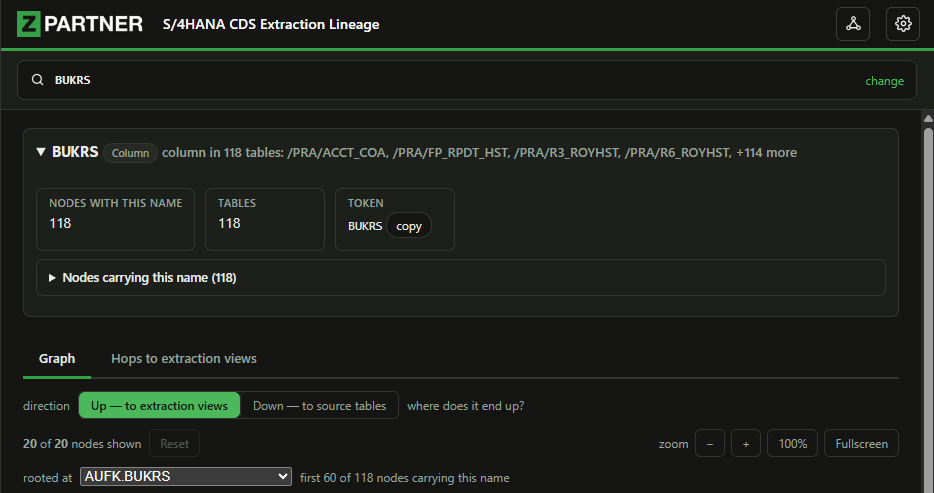
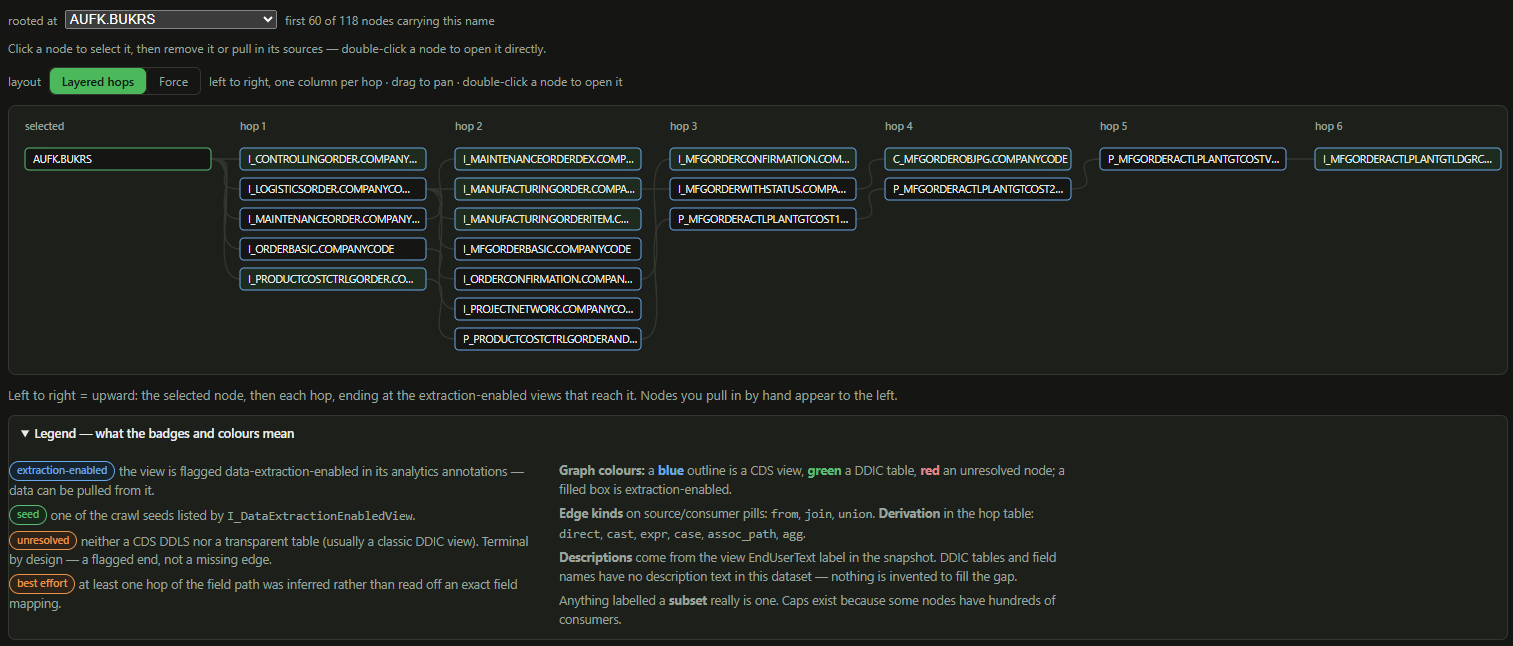
The viewer connects these perspectives. Starting with BUKRS, a consultant can inspect the matching source occurrences, select the relevant business context, and follow the field through each CDS layer. The lineage shows where the element is projected, where it is renamed to CompanyCode, which intermediate views participate, and which extraction-enabled CDS view finally provides the value.
The same example works in reverse. Starting from CompanyCode in a CDS view used by SAP Datasphere or another consumer, the consultant can trace the element back through the view hierarchy until the original source field BUKRS and its table context become visible.
The example illustrates the method, not the scope. The viewer is not a dedicated company-code tool. It applies the same lineage approach to other fields, tables, applications, and reports and business requirements represented in the available corpus.
05 · Consulting workflow
Use lineage to structure requirement analysis
The viewer is most effective when it is integrated into a repeatable consulting workflow. The objective is not merely to find a plausible CDS view, but to create an evidence-based path from the initial requirement to a technically appropriate source.
| # | Step | What to do |
|---|---|---|
| 01 | Capture the business entry point | Record the application or report, field, table or business statement supplied by the stakeholder. Preserve the original terminology because it is the reference point for validation. |
| 02 | Resolve the correct technical occurrence | Search the viewer and distinguish between duplicate field names, reused elements and similarly named objects. Select the occurrence that matches the process and source-system context. |
| 03 | Trace in the required direction | Move toward an extraction-enabled CDS view for a new analytics requirement, or move toward source tables and fields when validating an existing CDS artifact. |
| 04 | Interpret every modeling transition | Review projections, renaming steps and intermediate CDS layers. Confirm that the semantic element remains consistent with the business meaning throughout the path. |
| 05 | Validate and document the result | Use the lineage path as technical evidence in design decisions, mapping specifications, extraction documentation and stakeholder communication. |
For SAP Datasphere projects, this workflow shortens the step between a source-system requirement and a usable extraction interface. The analysis is still performed in the broader context of CDS lineage: Datasphere consumes the result, while the viewer explains how the result is derived.
The same process supports design reviews, migration preparation, change-impact analysis and knowledge transfer. In each case, the viewer reduces dependency on undocumented expert knowledge by making the relevant relationships visible and repeatable.
06 · Technical value
Why bidirectional navigation is the decisive advantage
AI is powerful — expertise makes it useful.
AI can accelerate searches, explain naming patterns, draft documentation, and suggest possible relationships. It can help a consultant move from a field such as BUKRS to a structured hypothesis much faster.
But speed is not the same as correctness. Lineage still has to be interpreted against SAP semantics, CDS annotations, joins, filters, authorisations, release status, and the specific customer landscape. AI is excellent when the person using it understands what the system is doing, can challenge the result, and knows how to validate it.
The practical rule: use AI to extend professional judgement, not to replace it.