SAP Datasphere · Task Chains
Introduction
Task chains in SAP Datasphere often run on a schedule, frequently overnight, to load data before business users start their day. When a chain fails, the standard way to notice is to open the Data Integration Monitor the next morning, which can be too late. Just as often the opposite is needed: someone has to know as soon as the chain has finished successfully, because the next activity in the process depends on it.
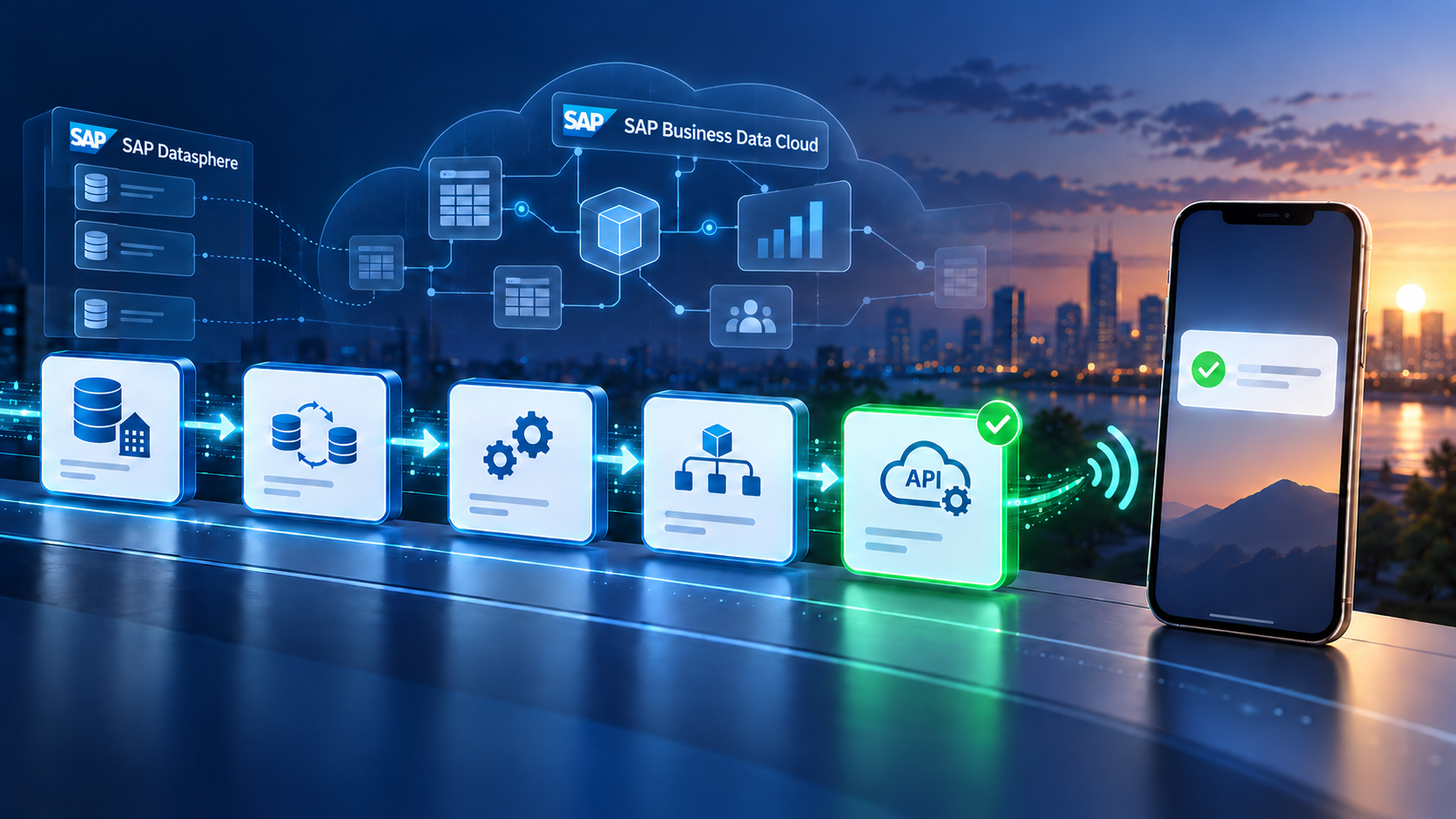
Using the API Task introduced in Task Chains, we can call an external service the moment a chain finishes and receive a push notification on a mobile phone. This blog describes a lightweight setup based on ntfy.sh, a free notification service that requires no account and no middleware.
Where this is useful in practice
Consider a typical finance reporting setup. A task chain starts at 01:00, replicates FI/CO data from SAP S/4HANA, runs several transformation flows, and has to be finished before the SAP Analytics Cloud models are refreshed and the controlling team opens its dashboards at 08:00. Without a signal, someone logs in early just to be sure. With a notification, the phone shows that the load completed at 03:12 and nobody has to check anything.
The same mechanism covers a number of situations that come up regularly in projects:
- Month-end close. During closing week the controlling team wants to know the exact minute the FI/CO chain is done, because the first reconciliation report is started manually right afterwards. One shared topic replaces a stream of „is the data in yet?“ messages.
- Handover between time zones. An offshore team loads data overnight and an onshore team starts its checks in the morning. The notification, with its timestamp, becomes the handover signal and can be pasted straight into the shift log.
- Dependencies outside Datasphere. A downstream activity in another system, a planning tool, an SAC data action, a script on an on-premise server, can only start once the chain is done. Until full orchestration is in place, notifying the person who starts that activity is often enough.
- Go-live and hypercare. In the first weeks after go-live the project team watches every single run. Notifications give that visibility without keeping the Data Integration Monitor open all day.
- Alerting the person on duty. Attached to the failure path with a different message, the same API Task reaches whoever is on call, instead of leaving the error to be discovered the next morning.
What Datasphere already offers: the notification step
Before adding anything to a chain, it is worth knowing what task chains already provide. Every task chain comes with a built-in notification for e-mail. You define the recipients and choose whether the mail is sent for every run or only when a run has completed with an error. No connection, no external service and no consent step are involved, and for a team that works out of its inbox anyway this is the shortest path to a signal. If a mail is all you need, this is where you should stop reading and configure it.
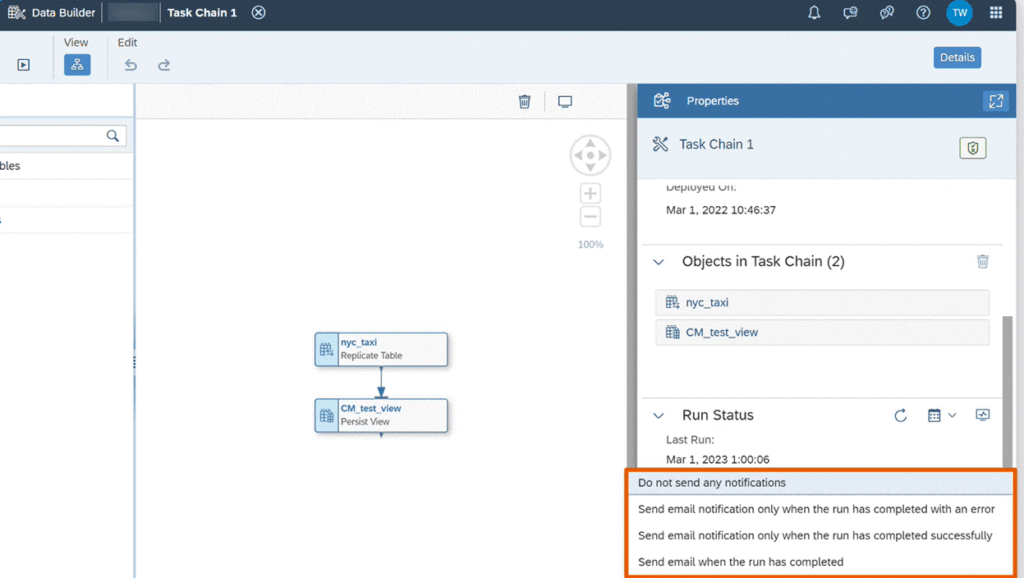
The built-in notification options on a task chain.
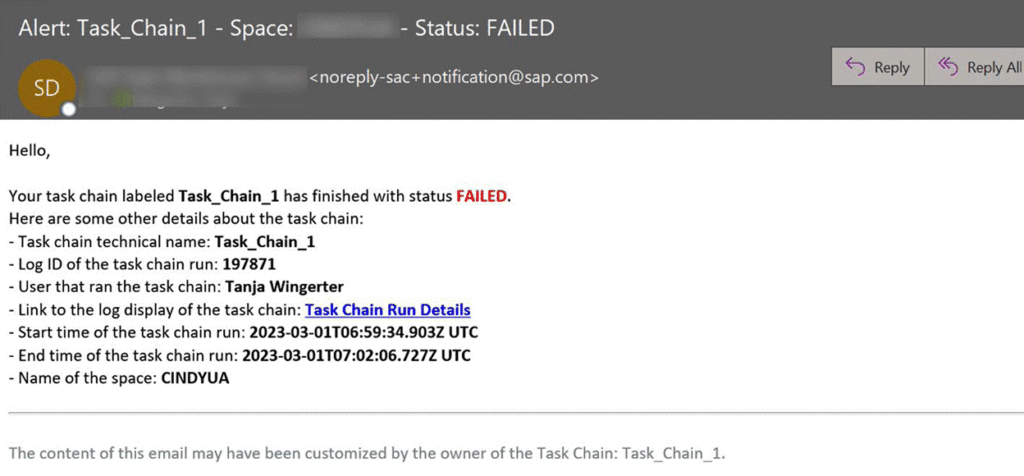
A sample built-in e-mail notification for a failed run.
What the standard notification does not do is reach a phone as a push message, reach people who do not have a Datasphere user, or deliver the signal anywhere other than a mailbox. That is exactly where the API Task comes in, and it is why we use it here: the ntfy example in this blog is deliberately a showcase for the API Task rather than the only way to be notified. The very same API Task can post into a Microsoft Teams channel, create a ticket, trigger a downstream job or call any other HTTP endpoint — the notification step cannot.
In a productive landscape the two complement each other rather than compete: the standard e-mail notification as the documented record of every run and for the error case, and the API Task for the one signal that somebody actually has to act on right away.
Overview
The solution has four parts:
- Task Chain — the existing data-loading chain.
- API Task — a step that sends an HTTP request when the chain finishes.
- HTTP Connection — allows the API Task to reach ntfy.sh.
- ntfy.sh + mobile app — receives the message and pushes it to the phone.
In this blog, we will see how to configure a task chain so that it pushes a notification as soon as it has finished.
Step 1 – Subscribe to a topic in the ntfy app
Install the ntfy app (Google Play / App Store). It opens without a login. Tap Subscribe to topic and enter a long, hard-to-guess topic name. Anyone who knows the name can send messages to it, so treat it like a password. Keep the server as ntfy.sh.
You can verify the phone side from any terminal before configuring Datasphere:
curl -d "Test message" ntfy.sh/"topic name"Step 2 – Create a Generic HTTP connection
In Datasphere, open Connections, select your space, and create a new Generic HTTP connection.
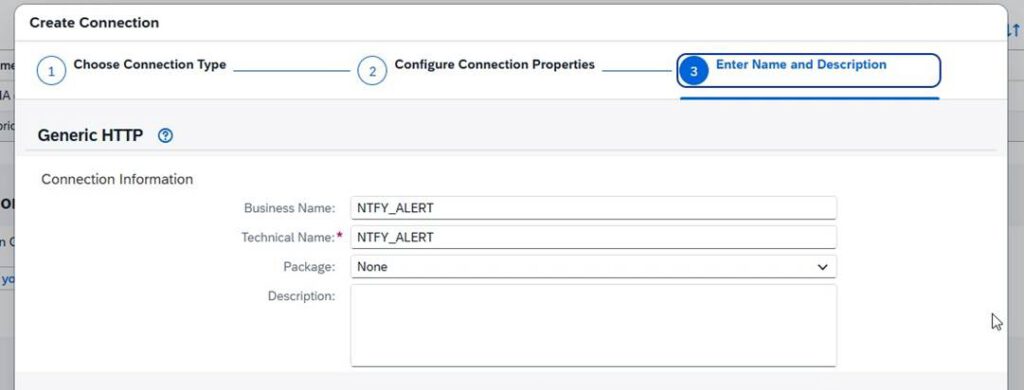
Generic HTTP connection setup in SAP Datasphere.
Use the following values:
| Host | ntfy.sh |
| Port | 443 |
| Authentication | None |
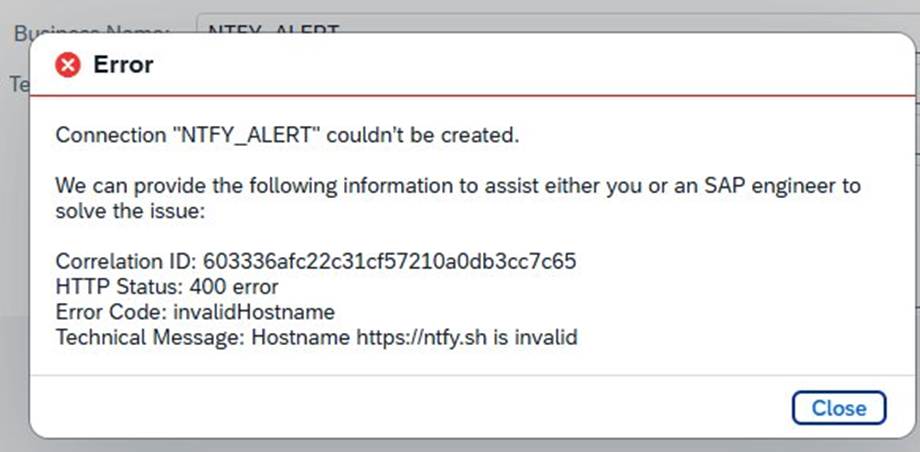
The error shown when the scheme is included in the host field.
Note – host format. Enter the host name only. Including the scheme (https://ntfy.sh) results in an invalidHostname error, because the host field expects ntfy.sh without https://. Port 443 is the standard HTTPS port; leave TLS enabled.
Do not put the topic name in the connection; the connection points to the server only.
Step 3 – Grant scheduling consent
On the first run, the chain may stop with a message stating that SAP has not been authorized to run task chains on your behalf. This is a one-time consent, not a configuration error.

Scheduling consent must be granted once per user.
Open your user profile → Settings → Authorized Consent Settings → Grant Consent, confirm with your login, and run the chain again. The consent must be granted by the chain owner and may need to be renewed if the identity provider changes.
Step 4 – Configure the API Task
In the task chain editor, add an API Task from the toolbar, open its Properties panel, and select the connection from Step 2.
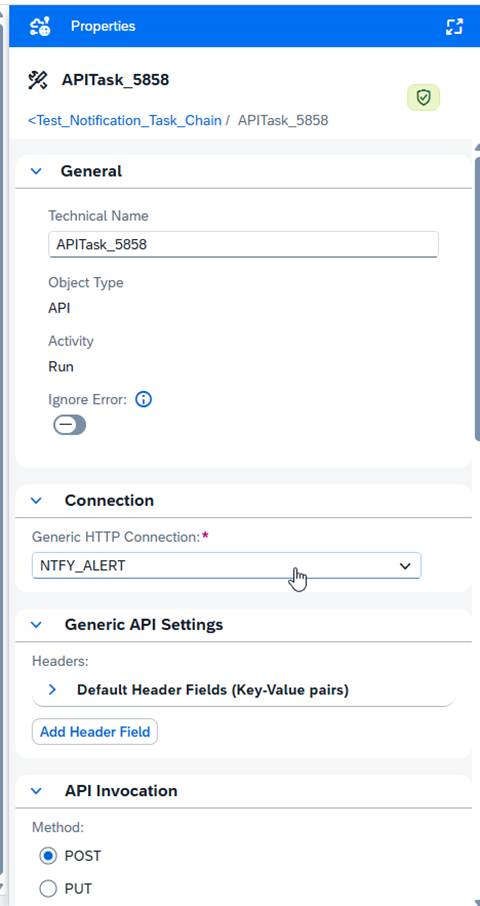
API Task properties: General settings and the connection.
Datasphere requires the request body to be a JSON object. Sending plain text results in Property "/invokeAPI/request/body": must be object. The default Content-Type: application/json header is already present, so there is no need to add it manually; the additional-header field rejects standard header names on purpose.
Use these settings:
| Method | POST |
| Path | / (root only) |
| Headers | keep the default application/json headers |
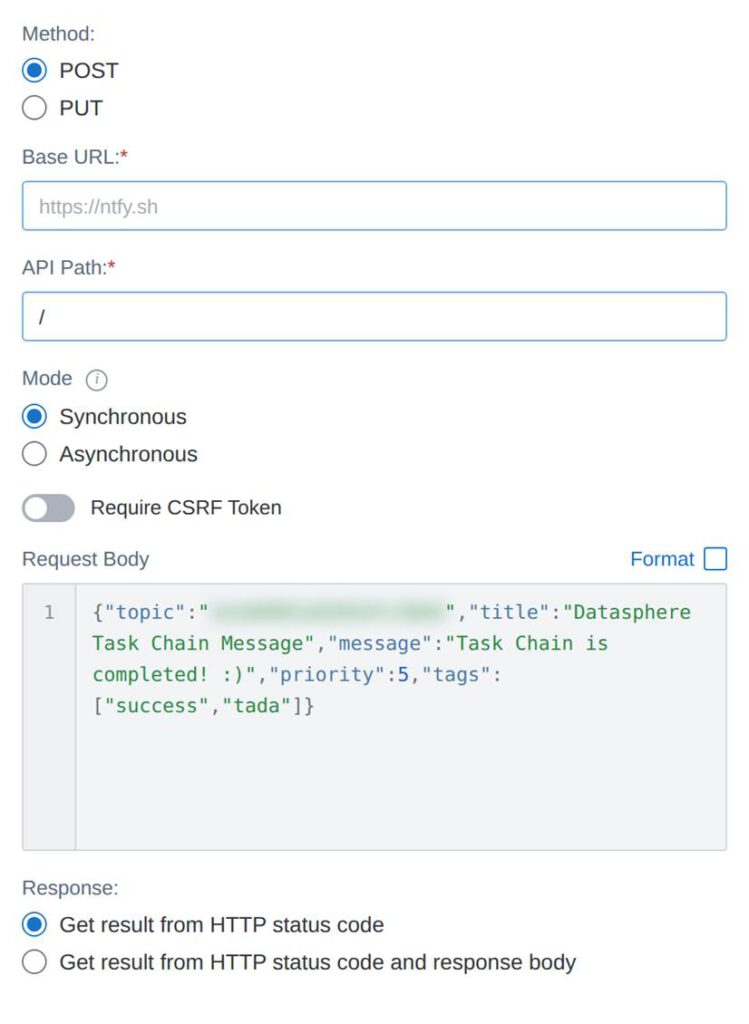
API Task invocation settings: base URL, path and request body.
Request body (replace the topic with your own):
{
  "topic": "****",
  "title": "Datasphere Task Chain Message",
  "message": "Task Chain is completed! :)",
  "priority": 5,
  "tags": ["success","tada"]
}
Note – path must be the root. When the body is JSON, ntfy expects the request at the root URL with the topic inside the body. If the topic is placed in the path instead, ntfy treats the body as plain text and the notification shows the raw JSON. Setting the path to / and keeping the topic in the body resolves this. The „topic“ value must match the subscribed topic exactly.
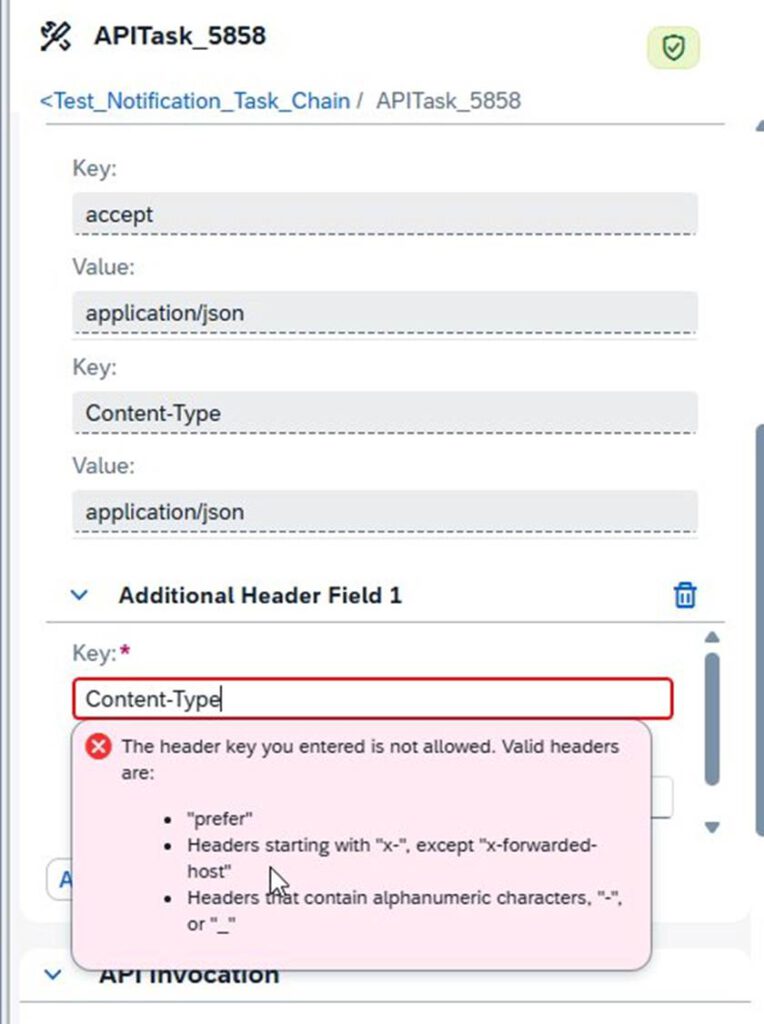
The additional-header field rejects standard headers; Content-Type is already set by default.
Connect the API Task to the success path
Draw a connection from the preceding step to the API Task and set it to run on success. Then Save and Deploy the chain.
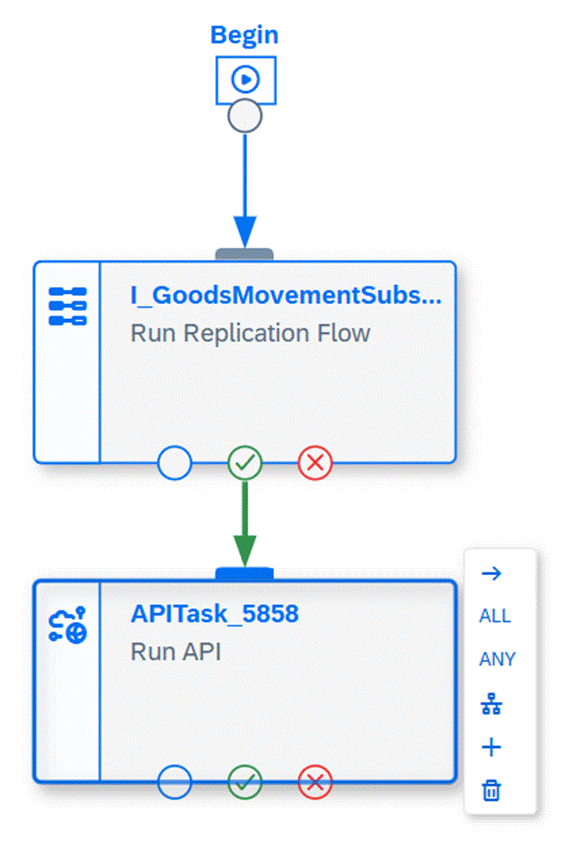
The API Task connected to the preceding step’s success path.
Result
When the step succeeds, the API Task fires on the success path and a formatted notification appears on the phone within seconds, with a title, a message and high priority. A failed run produces no notification, because the API Task is connected to the success path only. Flipping this around would give you a single high-priority message only when the chain fails, and it is a small change: connect the API Task to the failure path instead and adjust the message body. If the failure path is what you are after, start with SAP’s documentation on Use Task Chain Notifications for the built-in error mail.
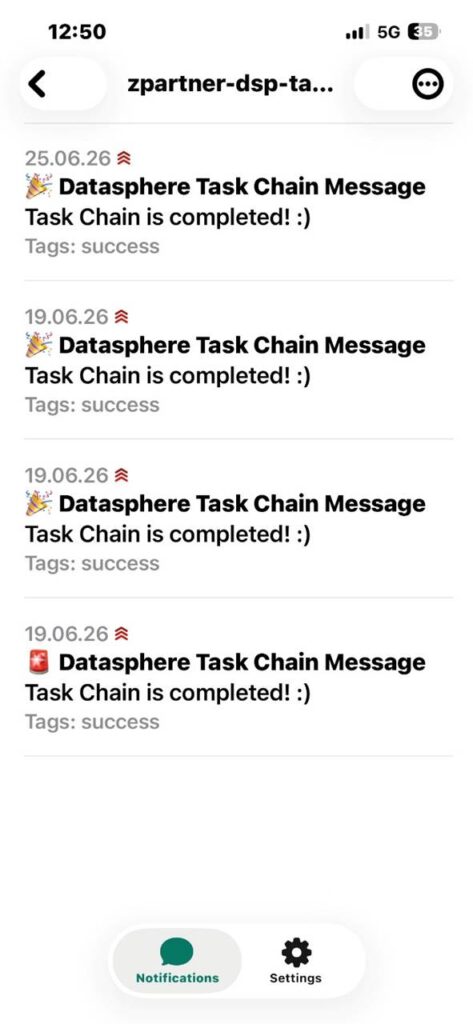
The notification delivered to the phone via ntfy.
Points to consider before using this in production
The setup above takes about fifteen minutes and works well as a proof of concept. A few points are worth agreeing with the team before it becomes part of a productive landscape.
- The topic name is the only protection. On the public ntfy.sh server, anyone who knows the topic can both publish to it and read from it. A long random name is the minimum; for regular use, an access-controlled topic with a token, or a self-hosted ntfy instance, is the better option.
- Keep business data out of the message. The text travels through a third-party service, so limit it to which chain finished and when. No record counts from sensitive tables, no customer or employee names, no technical details about the landscape.
- The request body is static. The JSON is typed into the API Task, so the message never changes from run to run. If several chains should send different texts, each one needs its own API Task.
- A failed notification is not a failed load. If the endpoint cannot be reached, the API Task itself can end in error even though the data was loaded correctly. Agree how such a run should be interpreted, and keep the API Task at the end of the chain so that it never sits in front of a loading step.
- Clear the outbound call with your security team. Not every organisation allows calls from Datasphere to public endpoints that are not on an approved list.
- Keep the volume low. One message per chain per run is useful; one per step is noise, and noise gets muted. Notify for the chains that a business process actually depends on.
Conclusion
With the API Task in Task Chains, SAP Datasphere can trigger external notifications without any additional middleware. Connecting the API Task to the success path turns it into a simple and reliable signal that the data is ready. The same approach can be extended to name the chain in the message, to notify a whole team on one topic. It is a small addition to a chain, but it removes a surprising amount of manual checking from the morning routine. The built-in notification step covers the classic e-mail case; the API Task is what makes the signal reach anything beyond a mailbox.