Introduction
This short post presents some basic information about ABAP CDS annotations and aims to illustrate the structure, characteristics, and effect of annotations in the context of ABAP CDS using examples. Given the sheer number of annotations and their possibilities, this post naturally covers only a small slice of the whole spectrum.
What are annotations, and which ones does SAP provide?
The annotations specified by SAP are used to enrich CDS objects with additional data, which can be used to define various settings, properties, and functional extensions. In principle they can be divided into two categories: ABAP annotations and component annotations, also called framework-specific annotations. Within these groups, annotations are further divided into different domains:
- ABAP annotations are evaluated by the ABAP runtime environment
- Component annotations are evaluated by the framework of other software components, such as Analytics
A list of all annotations available in the system can be retrieved, for example, with the ABAP program ABAP_DOCU_CDS_ANNOS_OVERVIEW:
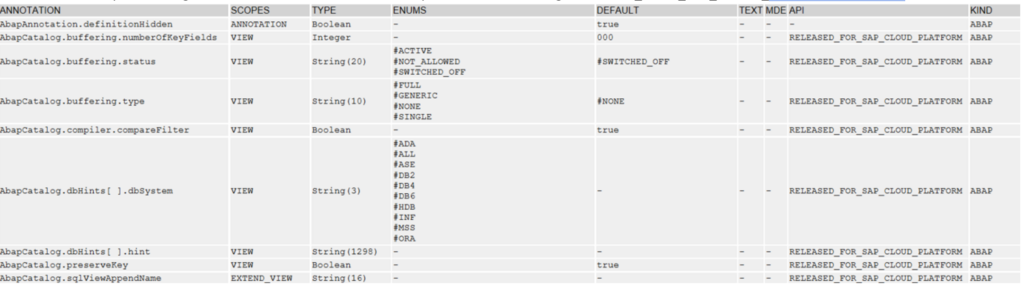
Among other things, the report outputs the following useful information:
- Name of the annotation
- Scope of an annotation (e.g. VIEW if the annotation affects the whole view, or ELEMENT if only one element/field is affected)
- Data type of the annotation value
- Possible values for the annotation
- Default value of the annotation (if any)
- Availability of the annotation in ABAP on Cloud
- Type of the annotation (ABAP or framework)
Information can also be called up directly in the source code within the view definition by placing the cursor on the respective annotation and pressing F1. Of course, information can also be obtained directly from the corresponding SAP Help pages.
Structure of annotations
The structure of annotations can be viewed as hierarchical. The following figure shows, as an example, the structural layout of the AccessControl domain, whose annotations belong to the ABAP annotations:
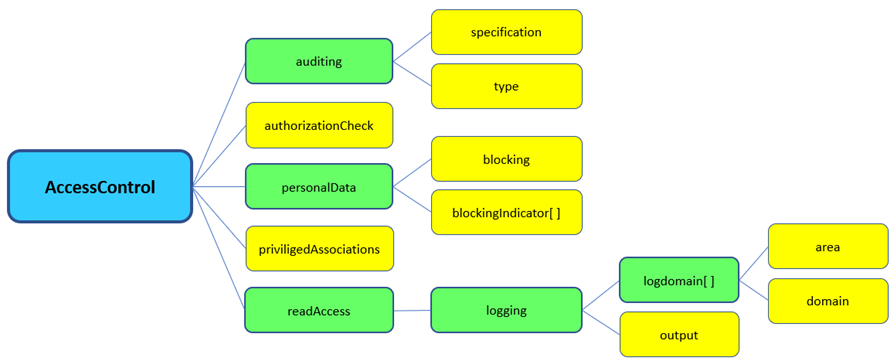
As visible here, an annotation domain, which can be regarded as the parent node (blue), can contain sub-nodes and be several levels deep. The green elements represent sub-nodes, the yellow ones are leaf nodes to which values are ultimately assigned. The number of leaves in the domain therefore also corresponds to the number of annotations that domain provides.
Using this domain, we show two examples of annotation notation:
@AccessControl.personalData.blocking: #REQUIRED
@AccesControl.authorizationCheck: #CHECK
The syntax specifies that annotations are always introduced with the @ symbol, and the name contains the entire structure, with nodes separated by dots. The value of the leaf node (in our examples #REQUIRED and #CHECK) is given after the colon. Case sensitivity must also be strictly observed. Only values with the data type defined for the respective annotation can be assigned, and the notation differs depending on the type: variable values are written in quotes, fixed constants with a hash as a prefix. Boolean values are entered without any additional characters. If you apply several annotations from the same domain to one and the same element, the notation can also be combined into a single line (see the example Annotation for additional field information).
Annotations when creating a CDS view
As already mentioned, the scope of an annotation can affect the entire view or just a single element. When a CDS view is created, some annotations affecting the view are already included in the header by default. These are explained briefly here:
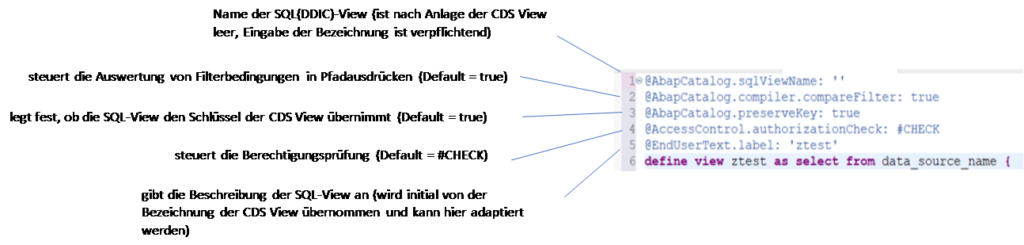
Except for the first annotation, AbapCatalog.sqlViewName, which always requires a name for the SQL view to be generated, all other visible annotations here are optional (the default values of the annotations would remain valid, however, even if they are removed).
Application examples for annotations
Use when defining a DDIC object
In the following example, a dictionary table called ztposa is defined in Eclipse via DDL in the ABAP Development Tools, which among other things contains an amount field value of ABAP type CURR (line 9). The corresponding reference field for the currency key cky, of ABAP type CUKY, is defined in line 10:
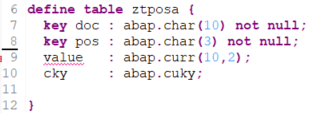
Checking this definition initially results in the following error:

The reference field for the currency must first be assigned to the amount field value accordingly via the semantic annotation Semantics.amount.currencyCode (line 9):
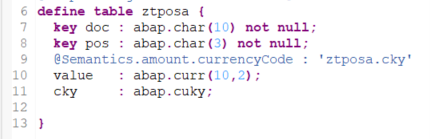
Unlike the annotations in the header, this annotation does not apply to the entire view but only to one element, the field value.
Annotations in analytical applications
The following examples already build on consumption views, i.e. analytical scenarios that sit relatively high up in the virtual data model. However, they are very well suited to illustrating the function and effect of annotations.
Annotations in a CDS consumption view of type CUBE
In the following example, a CDS view is defined as a consumption view via the annotation VDM.viewType (line 7) and thereby made available for analytical purposes. In line 6, the annotation Analytics.dataCategory with the value #CUBE is used to define the view as a classic multidimensional InfoProvider:
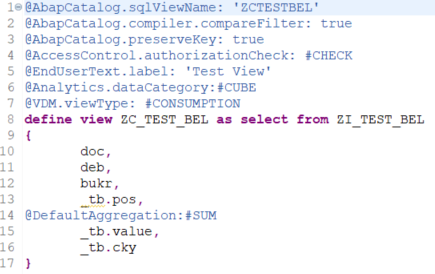
In the select statement, the annotation DefaultAggregation with the value #SUM is set in line 14, before the amount field _tb.value. The scope of this annotation applies to the field _tb.value.
This annotation is a framework-specific annotation. In this case, it causes the element _tb.value to be defined in the view as a key figure with summation as the default aggregation, and values are summed in analytical applications during aggregation, or in result rows. Let’s look at the result of our CDS view in Analysis for Office:

With additional fields in the drilldown and a result row based on the field pos:
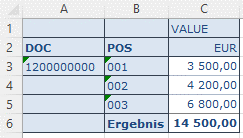
Without the DefaultAggregation annotation, the amount would not be aggregated, i.e. in our case not summed. This is what the result would look like:

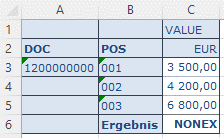
Of course, the other common aggregation types (MIN, MAX, etc.) are also available for the default aggregation.
Annotations in the context of query design
The following figure again shows a consumption view, in this case of type Query. For the view to be interpreted as a query, the annotation Analytics.query was set to the value true in line 7:
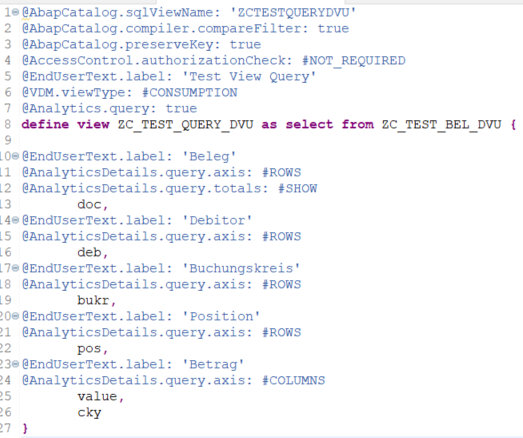
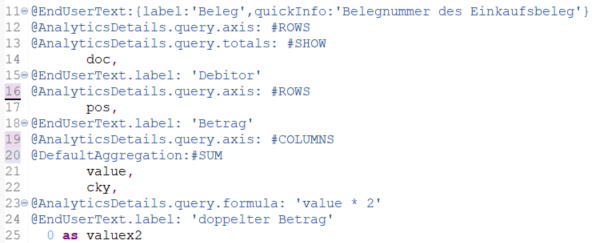
The annotation Analytics.Details.query.axis, placed at the relevant spots in the select statement with the values #ROWS and #COLUMNS, defines which field appears in the rows and which in the columns of the initial drilldown. The annotation AnalyticsDetails.query.totals in line 12 additionally ensures that a result row is formed by default based on the field doc. With the annotation EndUserText.label, which is additionally placed before each field in the select statement, the field name label is overridden by the descriptions given in quotes.
This is what the query’s initial drilldown looks like in the frontend, according to the view definition and annotations:
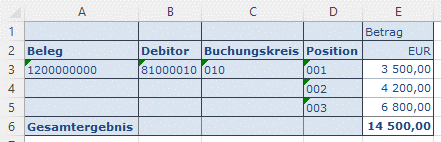
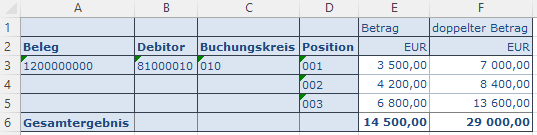
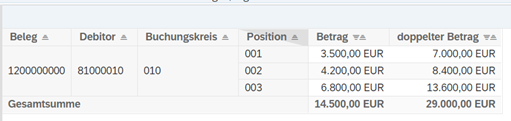
If we now want to extend the query with a formula, for example, we can do this quite simply by adding an extra field to the select statement (in this case valuex2) and defining a formula via the annotation AnalyticsDetails.query.formula placed before it (here value * 2). So here we perform a simple multiplication of the amount by two:
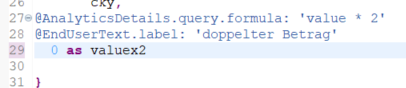
As in the previous examples, we use the annotation EndUserText.label to override the field labels in the report.
This is what the view looks like when executed in AFO:
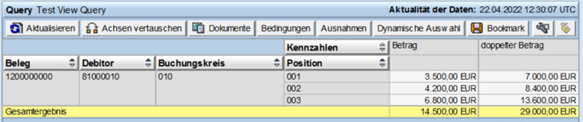
Since the view is defined as a query, it can also be executed via RSRT or in the Fiori Launchpad’s query browser:
Annotation for additional field information
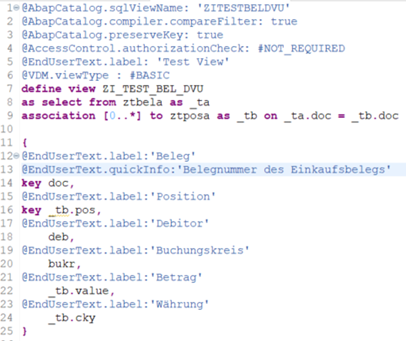
In the final example, we consume a simple CDS view via an ABAP report and output it as an ALV list. In addition to the already familiar EndUserText.label annotations, the annotation EndUserText.quickInfo is now also added in line 13, containing supplementary text information for the field doc.
The result of the view via the ABAP report in ALV format:
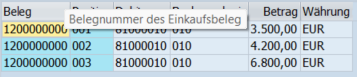
As you can see, the annotation in line 13 causes the additional information (quick info) to be displayed when you move the mouse over the Beleg field.
If we recall the beginning of this post and the structure of annotations, a domain can contain several annotations. In this example, we likewise apply two different annotations (lines 12 and 13) from the same domain EndUserText to one and the same element. The elements label and quickInfo represent two leaf nodes of the EndUserText domain. In such cases, the notation for the annotations can be combined into a single line as follows:
@EndUserText:{label:’Beleg‘,quickInfo:’Belegnummer des Einkaufsbelegs‘}
The colon follows directly after the domain, and the two elements (leaf nodes) label and quickInfo (including their values) are placed in curly braces and separated by commas.
Conclusion
As this short post already shows, the possibilities of annotations in the context of ABAP CDS go far beyond commenting or structuring code, and represent a powerful tool for defining and modeling data as well as for functionally extending CDS views.